Top Lightweight Tools Under 10MB
GetApkFree Team
Small, fast Android utilities that do one job well — every app here ships under 10MB and runs comfortably on older hardware.
Quick Answer
Small, fast Android utilities that do one job well — every app here ships under 10MB and runs comfortably on older hardware.
Storage fills up fastest on the phones that can least afford it. If you are running a device with 32GB or less, a 90MB utility that does one thing is a bad trade.
Everything below is under 10MB installed.
Why size still matters
A smaller APK usually means fewer bundled SDKs, which means fewer background wakeups and less battery drain. It is a rough proxy, not a rule — but it correlates. A 90MB app can absolutely be well-behaved, and a 2MB one can still misbehave; size just tends to track how much a developer chose to bundle in, and bundling in less generally means less running in the background you didn't ask for.
All three apps below share one other thing worth naming directly: each one solves a single, specific problem and stops there. None of them are stripped-down versions of a bigger product — they were built small on purpose.
| App | Size | Does |
|---|---|---|
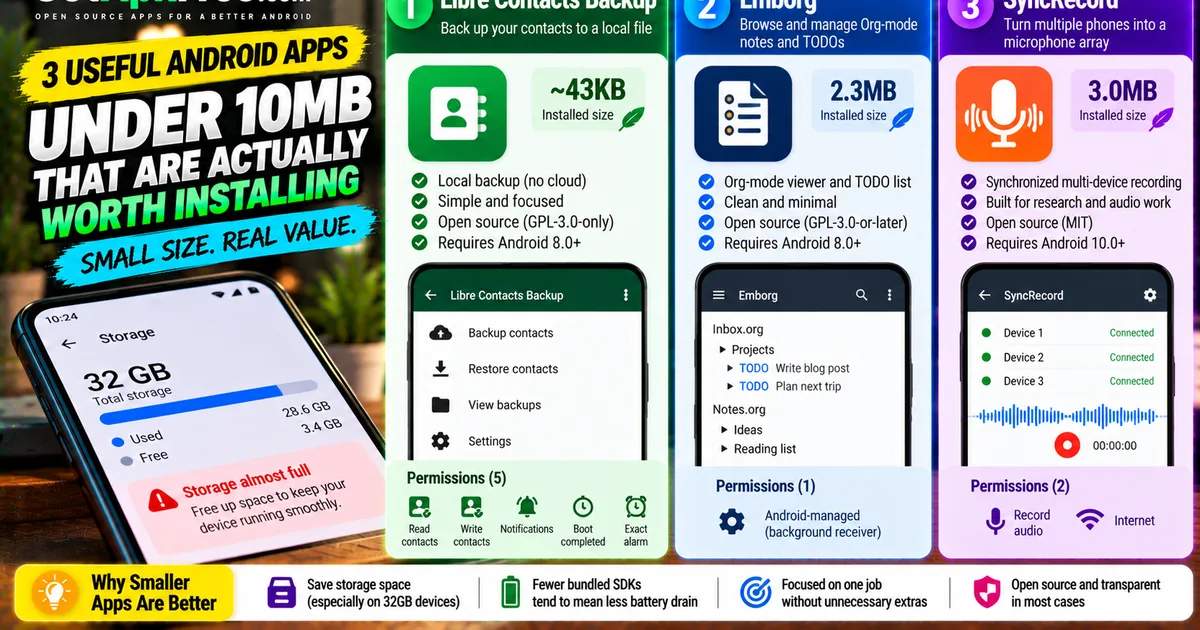
| Libre Contacts Backup | ~43KB | Backs your contacts up to a local file |
| Emborg | 2.3MB | Browses and manages Org-mode notes and TODOs |
| SyncRecord | 3.0MB | Syncs several phones into one microphone array |
The list
1. Libre Contacts Backup
At roughly 43KB installed — small enough that a one-decimal size display rounds it down to "0.0MB" — this is about as close to the floor as a working Android app gets. Libre Contacts Backup does one job: it copies your phone's contacts to a local backup file, with no account and no cloud step in between. The practical use case is straightforward — run it before a factory reset or a phone swap, or leave it scheduled in the background as a periodic safety net, and the backup file stays on your device unless you choose to move it yourself.
Its five requested permissions map directly onto that one job, with nothing left unaccounted for: READ_CONTACTS and WRITE_CONTACTS to actually read and restore contacts, POST_NOTIFICATIONS to tell you a backup finished, and RECEIVE_BOOT_COMPLETED plus USE_EXACT_ALARM so scheduled backups can run without you opening the app first. It's GPL-3.0-only, needs Android 8.0 or later, and is built by Ashkan Rafiee. It belongs on a lightweight-tools list not because it was trimmed down from something bigger, but because there was never anything to trim in the first place.
2. Emborg
Emborg is 2.3MB, and it's built for a specific audience: people who keep notes and task lists in Org-mode, the plain-text outlining format most associated with Emacs. It lets you browse .org files on your phone with Org-aware formatting — headings and TODO states rendered as structure rather than as a wall of asterisks — and pulls open TODO items from across every file on your device into one combined task list you can check without opening each file separately.
If you don't already keep notes in Org-mode, this app has nothing for you, and it isn't trying to be a general-purpose notes app instead. The single permission it declares is an Android-managed one tied to how the app registers a background receiver, not a real user-facing data grant. It's GPL-3.0-or-later, needs Android 8.0+, and comes from developer John Renzenbrink. The small size here is a direct consequence of scope: a focused viewer and task list for one text format doesn't need much code to do its job well.
3. SyncRecord
The most specialized entry on this list. SyncRecord turns a group of separate Android phones into a single synchronized microphone array, aimed at acoustic research, sound-source localization, or any multi-device audio-recording setup where buying dedicated hardware isn't practical. It's a narrow, unusual use case — closer to a research tool than a consumer app — and at 3.0MB it's sized to match: two permissions that actually do something (RECORD_AUDIO to capture sound and INTERNET to keep the devices synchronized with each other) plus a background-receiver permission Android adds on its own.
It's MIT-licensed, requires Android 10.0 or later, and is built by Padraic McEvoy. It earns its spot here for the same reason as the other two: "lightweight" and "single-purpose" tend to travel together. An app built to do exactly one well-defined thing rarely accumulates the bulk that comes from trying to do five things adequately.
Checking size yourself
Every app page lists the download size next to the button, along with the permissions the current build actually requests — worth checking together, since a small app with a long permission list is more worth a second look than its size alone suggests. You can also filter the catalogue by the Android version you actually run, which quietly removes a lot of the bloated newer builds:
/?android=8.0&sort=downloads
Start from the catalogue or read the install guide.
Related Articles
How to Update Android Apps with Obtainium
Learn how to update Android apps with Obtainium, check for new releases, configure background update checks, and troubleshoot updates that are not detected.
GetApkFree Team
How to Fix CapCut Transitions Lagging on Android
Fix CapCut transitions lagging on Android with practical steps for choppy previews, heavy effects, transition settings, device performance, and export testing.
GetApkFree Team