Why Apps Vanish From Your Play Store
GetApkFree Team
An app you used yesterday is suddenly unavailable. Here's the policy deadline behind it.
Quick Answer
An app you used yesterday is suddenly unavailable. Here's the policy deadline behind it.
You search for an app you installed last year. The Play Store says it isn't available for your device. Nothing on your phone changed.
Two version numbers, doing different jobs
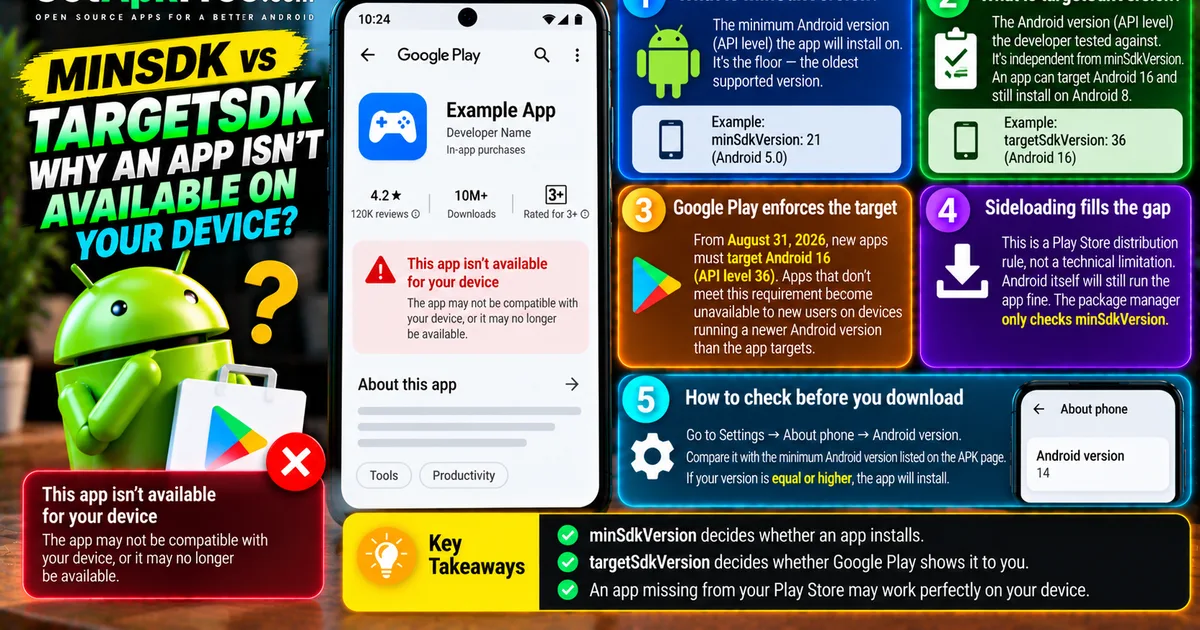
minSdkVersion is the floor - the oldest Android version the app will install on. targetSdkVersion is what the developer tested against. These are independent. An app can target Android 16 and still install on Android 8.
Google enforces the target, not the floor
For 2026 the requirement moves to Android 16, API level 36, on August 31. An app that misses it becomes unavailable to new users on devices running a newer Android version than the app targets. So the app disappears for people with the newest hardware.
This is the gap sideloading fills
That policy is a distribution rule, not a technical one. Android itself will still run the app fine. The package manager only checks minSdkVersion.
How to check before you download
Settings then About Phone then Android version. Compare it to the minimum listed on the APK page. Equal or higher means it installs.
The short version
minSdkVersion decides whether an app installs. targetSdkVersion decides whether Google Play shows it to you. An app missing from your Play Store may work perfectly on your device.
Related Articles
Roblox Not Loading Games on Android? How to Fix It
Roblox games not loading on Android? Fix endless loading screens, failed connections, and games that close unexpectedly with practical checks for your network.
GetApkFree Team
Reddit Notifications Not Working on Android? How to Fix It
Reddit notifications not working on Android? Fix missing replies, comment alerts, chat notifications, and delayed updates by checking Reddit settings,
GetApkFree Team
Snapchat Camera Not Working on Android? How to Fix It
Is Snapchat’s camera showing a black screen or refusing to take photos on Android? Check camera permissions, update the app, clear its cache, and follow these practical troubleshooting steps.
GetApkFree Team
Pinterest Images Not Loading on Android? How to Fix It
Pinterest images not loading on Android? Fix blank Pins, missing pictures, endless loading, and feed problems with these practical troubleshooting steps.
GetApkFree Team