APK vs AAB: What's the Difference and Which One Do You Need?
GetApkFree Team
APK vs AAB explained in simple terms. Learn how APK files differ from Android App Bundles, how AAB works, and why an AAB is not normally installed like an APK.
Quick Answer
APK vs AAB explained in simple terms. Learn how APK files differ from Android App Bundles, how AAB works, and why an AAB is not normally installed like an APK.
You may have seen both APK and AAB files mentioned around Android apps and wondered why the platform uses two different formats at all. The short answer: they solve different problems for different people. An APK is the installable package that ends up on your device; an AAB is a format developers use to publish an app, from which installable packages get generated. This guide walks through what each one actually is and where you're likely to encounter them.
What Is an APK?
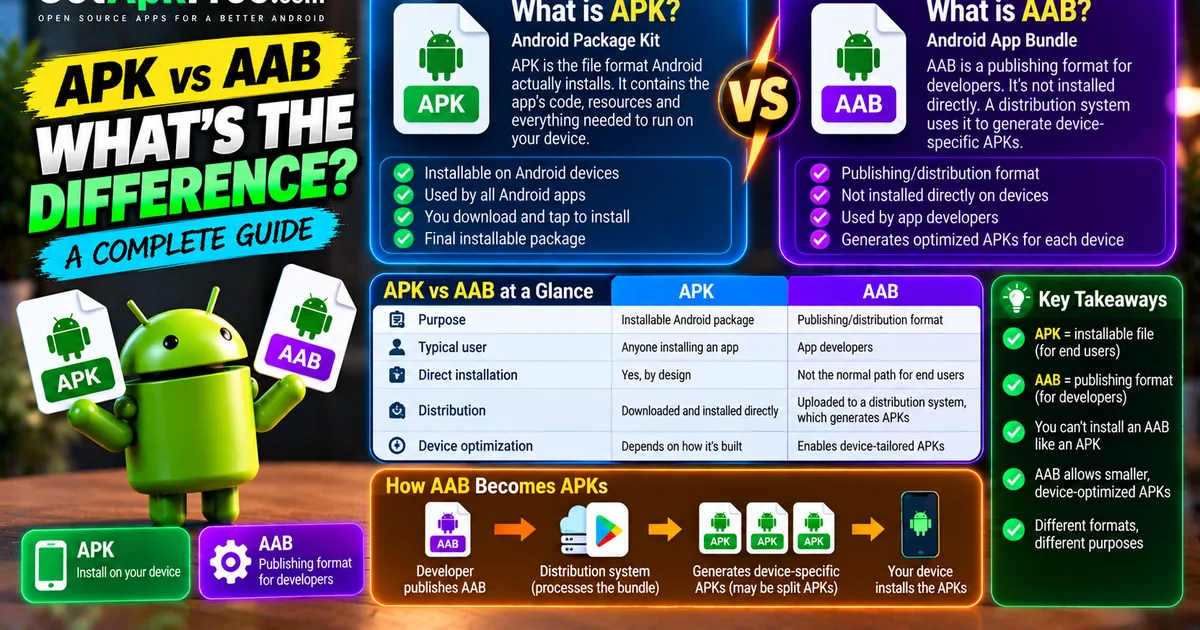
APK stands for Android Package Kit — the file format Android actually installs. Every app running on your phone is an APK at the point of installation, whether it arrived through the Play Store or you installed it yourself. An APK packages the app's compiled code, its resources, and everything Android needs to run it. From an ordinary user's perspective, an APK is the thing you download and tap to install — the end of the line, not an intermediate format.
What Is an AAB?
AAB stands for Android App Bundle — a format Google introduced for developers to use when publishing an app. An AAB isn't something Android installs directly; it's closer to a structured package describing an app's code and resources, organized in a way that a distribution system can use to generate the actual installable APKs a specific device needs. Where an APK is the finished, installable product, an AAB is upstream of that — a publishing format, not the normal end-user installation format.
APK vs AAB at a Glance
| APK | AAB | |
|---|---|---|
| Purpose | Installable Android package | Publishing/distribution format |
| Typical user | Anyone installing an app | App developers |
| Direct installation | Yes, by design | Not the normal path for end users |
| Distribution | Downloaded and installed directly | Uploaded to a distribution system, which generates APKs from it |
| Device-specific optimization | Depends on how the APK was built (single file or split set) | Enables a distribution system to generate device-tailored APKs |
| File structure | A complete, installable package | A structured bundle of modules/resources describing the app |
Why Was AAB Introduced?
The basic idea is straightforward: a single APK containing every resource an app might ever need — every language, every screen density, every CPU architecture — includes a lot that any individual device will never use. An AAB lets a developer provide all of that as organized modules and resources, and lets a distribution system generate a package for a specific device using only what applies to it. In principle, this means a user downloads less than they would with one universal, everything-included APK. That's the goal behind the format; the exact savings for any given app depend on how it's built and what it contains, not a fixed number.
How AAB Relates to Split APKs
This is the part that trips people up most, so it's worth being precise: an AAB is not itself a split APK, and a split APK set is not itself an AAB. The relationship is sequential — a developer publishes an AAB, a distribution system processes that bundle, and what actually reaches a device is a set of device-appropriate APKs (which may be delivered as a split set, exactly like the one described in our guide on what split APKs are and how they work). The AAB is the source material; split APKs are one possible outcome of processing it for a specific device. Not every path from an AAB necessarily produces the exact same combination of files for every device — what a device receives depends on that device's own configuration.
APK, Split APK, and AAB — Three Different Concepts
| Standalone APK | Split APK Set | AAB | |
|---|---|---|---|
| What it is | One complete, installable file | Multiple files that together form one installable app | A publishing format, not directly installable |
| Installed directly? | Yes | Yes, as a complete set | No, not in the normal end-user flow |
| Who typically handles it | Any user | Any user (usually via an app store) | Developers, distribution systems |
These three are related steps in the same broader pipeline, not interchangeable terms for the same thing.
Can You Install an AAB Like an APK?
No, not in the way you'd install a regular APK. Tapping an .aab file doesn't trigger Android's normal package installer the way an APK does, and simply renaming a file's extension from .aab to .apk doesn't change its actual internal structure — it'll still fail rather than install correctly. Developers do have their own tools and testing workflows for working with bundles directly, but those are development-oriented processes distinct from how an ordinary user installs an app, and not something this guide gets into.
How Device Configuration Affects APK Delivery
Whether an app ships as one universal APK or a device-tailored set, several device properties determine what's actually needed:
- CPU architecture/ABI — native code has to match what the processor understands, covered in detail in our guide on ARM64 vs ARMv7 APKs.
- Screen density — image assets sized appropriately for the display.
- Language — translated resources for the language actually in use.
- Other device-specific resources, depending on the app.
A distribution system generating APKs from an AAB uses exactly these properties to decide what a given device needs; a developer manually building a single APK has to decide how much of this to bundle in or split out themselves.
APK vs AAB for Developers
Developers commonly work with both, for different purposes: an AAB for publishing to a distribution system that supports generating optimized APKs, and a standalone APK for direct testing, sharing outside that pipeline, or scenarios where a plain installable file is simpler to work with. Neither format has fully replaced the other in every workflow — which one is appropriate depends on what a developer is actually trying to do at that moment.
APK vs AAB for Android Users
A few scenarios you might actually run into:
- You downloaded a file ending in
.apk— this is the normal, installable case. Proceed the way you normally would, from a source you trust. - You found a file ending in
.aab— this generally isn't meant for you to install directly; it's a publishing artifact, and encountering one outside a developer context is unusual. - You see multiple APK files for one download — that's a split set, not something broken; see our split APK guide for how to handle it.
- You need to know which package fits your device — check the version, package name, and architecture details covered in our guide on checking an APK's version and package details.
Common Misunderstandings
A few claims worth correcting directly:
- "AAB is just a newer APK." No — it's a different kind of format serving a different purpose (publishing vs. installing), not a version upgrade of the same thing.
- "Just rename
.aabto.apk." Renaming a file extension doesn't change its internal structure; this doesn't produce a working install. - "AAB and split APK are identical." An AAB is the source bundle; a split APK set is one possible thing generated from processing it for a device.
- "Every app makes both files available to users." Many apps are only ever encountered as APKs by end users — the AAB, where one exists, typically stays on the publishing side.
- "One APK always contains everything for every device." Only true for a universal, non-split build; a split set or device-generated APK intentionally contains less.
What Should You Download?
- Need a normal, installable package? Look for a compatible APK matching your device.
- Seeing a split set of several files? Treat them as one unit — they belong together, not as separate optional pieces.
- Found an AAB? That's generally a publishing/developer format, not the file an ordinary install flow needs.
- Whatever the format, use a trustworthy source and verify compatibility before installing anything.
Frequently Asked Questions
Is AAB better than APK? They're not really comparable that way — an AAB is a publishing format, an APK is what actually gets installed. "Better" depends on what you're trying to do with it.
Can Android install AAB files? Not directly through the normal installation flow the way it installs an APK.
Is an AAB the same as a split APK? No. An AAB is the bundle a developer publishes; a split APK set is one outcome that can be generated from processing that bundle for a specific device.
Why does Google Play use AAB? To let a distribution system generate device-tailored APKs from a single published bundle, rather than requiring a developer to hand-build every device-specific variant themselves.
Can I convert AAB to APK? Generating APKs from an AAB is part of the normal publishing pipeline that development tools handle. It's not something end users typically need to do, and isn't within the scope of this guide.
Which is better for users, APK or AAB? For an end user installing an app, an APK is the relevant format — an AAB isn't something you'd normally handle directly at all.
Why are there multiple APK files for one app? That's a split APK set, covering different device configurations like architecture or language — see our dedicated guide for the full explanation.
Final Thoughts
A simple way to keep these straight: an APK is the installable package that ends up on your device; an AAB is the format a developer uses to publish an app, from which distribution systems can generate installable APKs; and split APKs are device-specific components that may be delivered as one outcome of that process. Understanding which one you're actually looking at is most of what you need to know before deciding what to do with it.
Related Articles

Roblox Not Loading Games on Android? How to Fix It
Roblox games not loading on Android? Fix endless loading screens, failed connections, and games that close unexpectedly with practical checks for your network.
GetApkFree Team
Reddit Notifications Not Working on Android? How to Fix It
Reddit notifications not working on Android? Fix missing replies, comment alerts, chat notifications, and delayed updates by checking Reddit settings,
GetApkFree Team
Snapchat Camera Not Working on Android? How to Fix It
Is Snapchat’s camera showing a black screen or refusing to take photos on Android? Check camera permissions, update the app, clear its cache, and follow these practical troubleshooting steps.
GetApkFree Team
Pinterest Images Not Loading on Android? How to Fix It
Pinterest images not loading on Android? Fix blank Pins, missing pictures, endless loading, and feed problems with these practical troubleshooting steps.
GetApkFree Team