What Is a Split APK? How Android Uses Multiple APK Files
GetApkFree Team
Learn what a split APK is, why Android apps may use multiple APK files, how base and configuration splits work, and what to know before installing them.
Quick Answer
Learn what a split APK is, why Android apps may use multiple APK files, how base and configuration splits work, and what to know before installing them.
You go looking for one app and come away with a folder of several APK files instead of one — a base file, plus a couple of others with cryptic names attached. If you've never seen this before, it's not obvious which one to install, or whether you need all of them. This is a split APK, and it's a deliberate distribution method, not a mistake or a broken download.
What Is a Split APK?
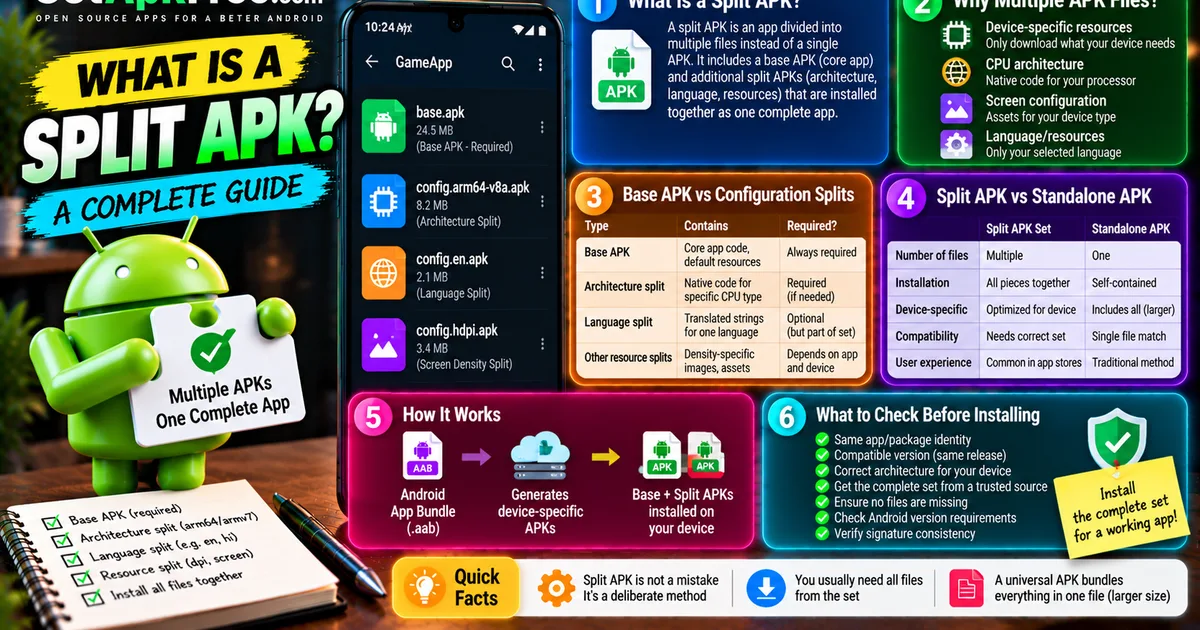
A split APK is one piece of an app that's been divided into multiple files rather than packaged as a single APK. At the center is a base APK, containing the app's core code and default resources. Alongside it sit one or more split APKs, each adding something specific — support for a CPU architecture, a language, or a screen density — that the base file alone doesn't include. Installed together, the full set behaves exactly like one complete app; none of the individual files is meant to be a standalone install on its own.
Why Does Android Use Multiple APK Files?
The underlying goal is avoiding waste: a single universal APK would need to contain every architecture, every language, and every resource variant an app might ever need, most of which any one device will never use. Splitting lets a device download only what actually applies to it:
- Device-specific resources — image assets sized for a particular screen density, rather than every density at once.
- CPU architecture — native code compiled for the specific processor type a device has.
- Screen/device configuration — layouts or assets tailored to a device class.
- Language/resources — translated strings for the language a user actually has selected, not every supported language bundled in.
The result is a smaller total download for any individual device, at the cost of needing more than one file to represent the complete app.
Base APK vs Configuration Splits
| Contains | Required? | |
|---|---|---|
| Base APK | Core app code, default resources | Always required |
| Architecture/ABI split | Native code compiled for a specific CPU type | Required if the base APK depends on it |
| Language split | Translated strings/resources for one language | Optional in practice, but part of the intended set |
| Other configuration/resource splits | Density-specific images, screen-specific assets | Depends on the app and device |
Not every app uses every category — a simple app with no native code might not need an architecture split at all, while a heavily localized app might ship many language splits.
ARM64, ARMv7, and Architecture Splits
Architecture splits exist for exactly the reason covered in our guide on ARM64 vs ARMv7 APKs: native code has to match the instruction set a device's processor actually understands. An arm64-v8a split contains code compiled for 64-bit ARM devices; an armeabi-v7a split contains the older 32-bit equivalent. Installing the wrong architecture split alongside a base APK produces the same kind of incompatibility as picking the wrong standalone APK variant — the device simply can't run code built for a different processor family.
What Is an Android App Bundle?
An Android App Bundle (.aab) is the format developers use to publish an app to the Play Store — it's not something an end user installs directly the way you'd install a plain APK. When someone downloads that app through the Play Store, Google's own systems generate and deliver a set of APKs tailored to that specific device's configuration from the bundle the developer uploaded. Split APKs, in other words, are often what comes out the other end of this process — the mechanism a device actually installs — while the App Bundle itself is the developer-facing publishing format upstream of that. Not every app is published as a bundle, and not every APK you encounter outside the Play Store originated from one.
Split APK vs Standalone APK
| Split APK Set | Standalone APK | |
|---|---|---|
| Number of files | Multiple (base + splits) | One |
| Installation concept | All required pieces installed together as one app | Self-contained, installs on its own |
| Device-specific configuration | Delivered as separate matching files | Bundled into the single file, or omitted entirely |
| Compatibility | Depends on getting the right combination of files | Depends on the one file matching your device |
| Typical user experience | More common through app stores handling the split automatically, or through export tools that bundle a matching set | The traditional single-file APK most people are used to |
Why Can't You Always Install One File From a Split Set?
A configuration split is not a functioning app by itself — it's an addition to the base APK, and typically has no independent value or even a runnable structure without it. Trying to install just one split, without the base APK it depends on, generally won't produce a working app; trying to install a base APK that needs an architecture split it doesn't have will leave the app missing code it needs to run. The pieces are designed to complete each other, not to function independently, which is why a partial set usually just doesn't work rather than installing a limited version of the app — sometimes surfacing as the same kind of parsing error an incomplete or malformed single APK would produce.
How to Recognize a Split APK Set
There's no single universal naming scheme every distributor follows, but a few signs are common:
- Multiple files delivered together for what's clearly meant to be one app.
- Filenames referencing an architecture (
arm64-v8a,armeabi-v7a) or a language code. - One noticeably larger file (the base) alongside smaller ones (the splits).
- Packaging that explicitly describes itself as a split-APK or app-bundle export, such as the
.apkmformat some distributors use to bundle a matching set together.
If you're not certain whether a container format like that represents a split set, our guide on APK vs XAPK vs APKM covers how those bundling formats work.
What Is a Universal APK?
A universal APK takes the opposite approach: instead of splitting resources across multiple files, it bundles everything — every architecture, every language — into one self-contained package. This trades a larger individual file size for simplicity: one download, no need to match multiple pieces together, and no risk of a mismatched combination. Whether a universal build or a split-delivery approach is used for a given app depends on how the developer or distributor chose to package it, not on any strict rule.
What Should You Check Before Installing APK Files?
- Same app/package identity — every file in the set should belong to the same package.
- Compatible version — all files should be from the same release, not mixed across versions.
- Compatible architecture — the architecture split should match your device.
- Trusted source — get the complete set from a source you already trust, not assembled piecemeal from unrelated places.
- File completeness — confirm nothing from the intended set is missing.
- Android compatibility — check the base APK's stated OS requirements, same as any other app.
- Signature consistency — files from a legitimate set are signed consistently; our guide on checking an APK's version and package details covers how to inspect these fields directly.
Mixing files from different versions or different sources into one install attempt is a common way a split set stops working — a base APK from one release paired with a split from another isn't a valid combination, even if both individually look legitimate.
Frequently Asked Questions
Is a split APK the same as an APK? A split APK is a piece of an app packaged as an APK file, but it's not a complete, standalone app on its own the way a normal single APK is.
Can I install only the base APK? Sometimes it'll install, but the app may be missing functionality or fail to run correctly if it depends on a split you didn't include — the base isn't guaranteed to be fully functional alone.
Why are there multiple APK files for one app? So each device only needs to download the architecture, language, and resource variants it actually uses, rather than every possible variant bundled into one large file.
What does arm64-v8a mean in a split APK? It's the label for a split containing native code compiled for 64-bit ARM devices.
Is an APK bundle the same as an Android App Bundle?
Not quite — an Android App Bundle (.aab) is the developer's upload format; the APK bundle or split set a device actually installs is generated from it, not the same file.
Is a universal APK easier to install? Generally yes, since it's one file with no pieces to match — the trade-off is a larger download than a device-specific split set would need.
Final Thoughts
A split APK isn't a broken or unusual download — it's a deliberate way of delivering only the parts of an app a specific device actually needs. The key is treating the set as one unit: same app, same version, matching architecture, from a source you trust, installed together rather than picked apart. Get a complete, compatible set, and a split APK behaves exactly like the single-file app you're used to.
Related Articles
Roblox Not Loading Games on Android? How to Fix It
Roblox games not loading on Android? Fix endless loading screens, failed connections, and games that close unexpectedly with practical checks for your network.
GetApkFree Team
Reddit Notifications Not Working on Android? How to Fix It
Reddit notifications not working on Android? Fix missing replies, comment alerts, chat notifications, and delayed updates by checking Reddit settings,
GetApkFree Team
Snapchat Camera Not Working on Android? How to Fix It
Is Snapchat’s camera showing a black screen or refusing to take photos on Android? Check camera permissions, update the app, clear its cache, and follow these practical troubleshooting steps.
GetApkFree Team
Pinterest Images Not Loading on Android? How to Fix It
Pinterest images not loading on Android? Fix blank Pins, missing pictures, endless loading, and feed problems with these practical troubleshooting steps.
GetApkFree Team