ARM64 vs ARMv7 APK: Which Android Version Should You Download?
GetApkFree Team
Confused by ARM64 and ARMv7 APKs? Learn what Android CPU architectures mean, how ARM64 differs from ARMv7, and how to choose a compatible APK.
Quick Answer
Confused by ARM64 and ARMv7 APKs? Learn what Android CPU architectures mean, how ARM64 differs from ARMv7, and how to choose a compatible APK.
If you've ever landed on an APK download page and seen separate links for "ARM64" and "ARMv7" — or filenames tagged arm64-v8a and armeabi-v7a — you've run into Android's CPU architecture split. Picking the wrong one doesn't just risk a suboptimal install; it can mean the app won't install at all. This guide explains what these labels actually mean and how to figure out which one applies to your phone.
What Does ARM Mean on Android?
ARM is a family of processor designs, and the overwhelming majority of Android phones run on ARM-based chips (a smaller number use Intel's x86 designs, covered briefly below). Not every ARM chip is identical, though — they've evolved through different generations, and an app's compiled code has to match the specific instruction set a chip actually understands. That's why an APK can come in more than one architecture-specific build.
What Is an ABI?
ABI stands for Application Binary Interface — the specific format a compiled piece of code needs to be in for a given processor to run it. Most apps are mainly written in a language like Kotlin or Java that Android runs in its own way regardless of chip, but many apps also bundle native code (compiled C/C++ libraries) for performance-sensitive tasks. That native code has to match the device's ABI exactly, which is the real reason architecture-specific APK variants exist at all.
What Is ARM64?
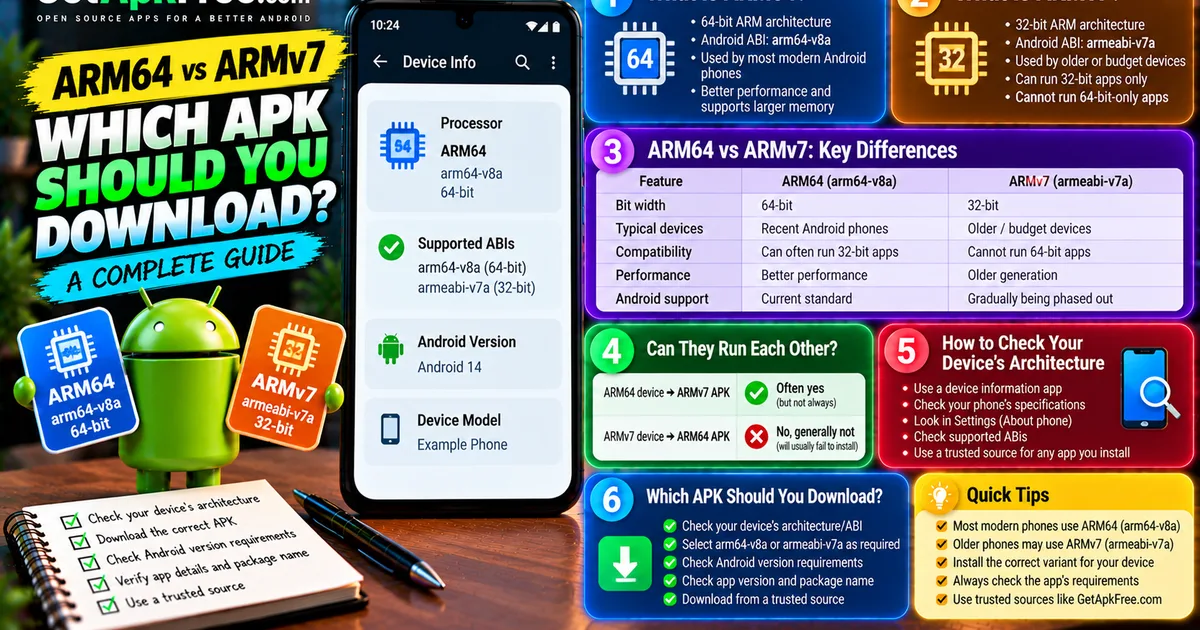
ARM64 refers to the 64-bit generation of ARM architecture. On Android, this shows up under the ABI label arm64-v8a. It's what the large majority of Android phones released in the last several years actually use, and it's the architecture Google now expects most apps to support as a baseline.
What Is ARMv7?
ARMv7 refers to the older 32-bit generation of ARM architecture, appearing on Android under the label armeabi-v7a. It's worth being precise here: "ARMv7" is the general architecture generation, while armeabi-v7a is specifically Android's own ABI label for it — related terms, not always perfectly interchangeable outside of an Android context. In practice, though, when you see either term on an APK download page, they're both pointing at the same 32-bit ARM target.
ARM64 vs ARMv7: What's the Difference?
| ARM64 | ARMv7 | |
|---|---|---|
| Android ABI label | arm64-v8a |
armeabi-v7a |
| Bit width | 64-bit | 32-bit |
| Typical devices | Most phones released in recent years | Older or budget devices |
| Compatibility direction | Can often also run 32-bit apps | Cannot run 64-bit-only apps |
This isn't a claim about exact market share — device mix varies by region and price tier — but as a general pattern, ARM64 is what you'll find on the majority of Android hardware still receiving updates today.
Can an ARM64 Phone Run an ARMv7 APK?
Often, yes. Many 64-bit ARM devices retain the ability to run 32-bit ARM code alongside 64-bit code, since Android's compatibility layers have historically supported both. That said, this isn't guaranteed for every device or every Android release — some newer devices and OS versions have moved toward dropping 32-bit support entirely, so "usually works" isn't the same as "always works."
Can an ARMv7 Phone Run an ARM64 APK?
No, generally not. A 32-bit ARM processor simply doesn't have the instruction set a 64-bit-only build requires — this isn't a software restriction Android is imposing, it's a hardware limitation. If you select an ARM64-only APK on an ARMv7 device, the install will typically fail rather than run in some degraded mode.
How Do I Check My Android Phone's CPU Architecture?
A few practical ways to find out:
- A device-information app — many reputable system-info utilities display supported ABIs directly.
- Your manufacturer's published specifications — the product page or manual for your specific phone model usually states its chipset, which you can then look up if the architecture isn't stated outright.
- Android's own system information, where exposed — some devices surface this under Settings' "About phone" or developer options, though the exact path and what's shown varies by manufacturer.
If you use a third-party inspection app for this, apply the same standard as any other app download: get it from a source you already trust.
How Do I Know Which APK Variant to Download?
- Identify your device's architecture/ABI using one of the methods above.
- Check whether the download offers
arm64-v8a,armeabi-v7a, or another labeled variant. - Match the APK to the ABI your device actually supports.
- Check the Android OS version requirement separately — architecture and OS version are two independent things to verify.
- Check the APK's version.
- Check its package identity.
- Verify the source is one you trust before downloading anything.
Our guide on checking an APK's version and package details covers steps 5 and 6 in more depth. If you'd rather not check architecture manually for every file, browsing GetApkFree's own catalogue gets you builds with this information already listed.
What If There Is Only One APK?
Plenty of apps don't split their release into architecture-specific downloads at all — instead, they bundle support for multiple architectures inside a single APK, or the app simply doesn't rely on the kind of native code that would require a split in the first place. Don't assume a file is incompatible with your device just because it has no architecture label in the filename; a lack of an explicit tag usually just means the developer chose not to distribute separate builds, not that compatibility is unknown.
Universal APK vs Architecture-Specific APK
A "universal" APK bundles code for multiple architectures in one file, so it works across a wider range of devices without the user needing to pick a variant. An architecture-specific build only includes what one ABI needs, which typically makes the individual file smaller — though exact savings vary by app and aren't something to assume a specific number for. Developers and distributors choose between these approaches for different reasons: convenience for users versus smaller individual downloads.
Can the Wrong Architecture Cause "App Not Installed" or Parsing Errors?
It can contribute to both, but it's not the only cause of either. An architecture mismatch is one of several things that can trigger a failed parse or a blocked install — our guides on fixing a parsing package error and fixing "App not installed" cover the fuller list of causes, since a corrupted download or a signature conflict can produce a similar-looking failure with nothing to do with architecture at all.
ARM64 vs Android Version: Are They the Same Thing?
No — these are three genuinely separate properties that are easy to conflate:
- CPU architecture/ABI — what instruction set your device's processor understands (ARM64, ARMv7, x86).
- Android OS version — the software version running on the device (Android 13, 14, and so on).
- App version — the version number of the specific application you're installing.
A phone can be ARM64 and running an older Android version, or ARMv7 running a relatively recent one — architecture and OS version don't move together, and neither has anything to do with the app's own version number.
What About x86 and x86_64 APKs?
Android has also historically supported Intel-style x86 and x86_64 architectures, mostly on a smaller number of devices and certain emulators. Unless you specifically know your device or environment is x86-based, this generally isn't the variant you're looking for — most phones are ARM-based, and selecting an x86 build for ARM hardware won't work any more than mismatching ARM64 and ARMv7 would.
A Simple APK Architecture Checklist
- Check your device's architecture.
- Identify the exact ABI label (
arm64-v8a,armeabi-v7a, etc.). - Match the APK variant to that label.
- Check the Android OS requirement separately from architecture.
- Check the app's version.
- Check the package name.
- Use a source you trust.
- Keep a backup if you're replacing an existing app.
Frequently Asked Questions
What is the difference between ARM64 and ARMv7 APK?
ARM64 is the 64-bit ARM architecture (arm64-v8a); ARMv7 is the older 32-bit generation (armeabi-v7a). They're not interchangeable — code built only for one generally won't run on the other direction.
What does arm64-v8a mean? It's Android's ABI label for the 64-bit ARM architecture.
What does armeabi-v7a mean? It's Android's ABI label for the 32-bit ARMv7 architecture.
Can ARM64 phones run ARMv7 APKs? Often, yes, since many 64-bit devices retain 32-bit compatibility — but this isn't guaranteed on every device or Android version.
Can ARMv7 phones run ARM64 APKs? No, generally not — a 32-bit processor lacks the instruction set a 64-bit-only build requires.
How do I know if my phone is ARM64? A device-information app or your manufacturer's published specifications will state the chipset or supported architecture.
Is ARM64 better than ARMv7? It's simply what most current devices use, not a universal upgrade you choose — your device's actual hardware determines which one applies to you, not preference.
What happens if I install the wrong APK architecture? The install typically fails, sometimes surfacing as a parsing error or "App not installed" rather than a clear architecture-specific message.
Is ARM64 the same as Android 64-bit?
Closely related but not identical wording — ARM64 refers to the processor architecture; "64-bit" more broadly describes that architecture class, which on Android specifically means arm64-v8a.
What is a universal APK? A single APK that bundles support for multiple CPU architectures, so it works across more devices without the user needing to choose a variant.
Final Thoughts
Architecture labels like ARM64 and ARMv7 describe your device's hardware, not its Android version or an app's version number — three separate things worth checking independently. Identify your device's actual architecture first, match it against whatever variant a download offers, and you'll avoid the most common reason a seemingly correct APK fails to install.
Related Articles

Roblox Not Loading Games on Android? How to Fix It
Roblox games not loading on Android? Fix endless loading screens, failed connections, and games that close unexpectedly with practical checks for your network.
GetApkFree Team
Reddit Notifications Not Working on Android? How to Fix It
Reddit notifications not working on Android? Fix missing replies, comment alerts, chat notifications, and delayed updates by checking Reddit settings,
GetApkFree Team

Snapchat Camera Not Working on Android? How to Fix It
Is Snapchat’s camera showing a black screen or refusing to take photos on Android? Check camera permissions, update the app, clear its cache, and follow these practical troubleshooting steps.
GetApkFree Team

Pinterest Images Not Loading on Android? How to Fix It
Pinterest images not loading on Android? Fix blank Pins, missing pictures, endless loading, and feed problems with these practical troubleshooting steps.
GetApkFree Team