APK vs XAPK vs APKM: What's the Difference and Which Should You Install?
GetApkFree Team
APK vs XAPK vs APKM explained: what each Android package format contains, how split APKs and OBB data work, and which one you should actually install.
Quick Answer
APK vs XAPK vs APKM explained: what each Android package format contains, how split APKs and OBB data work, and which one you should actually install.
If you've spent any time downloading Android apps outside the Play Store, you've probably noticed that not every file ends in .apk. Some come as .xapk, others as .apkm — and if you've never seen those before, it's not obvious what they are or whether they're safe to install.
Short answer: all three are ways of packaging an Android app. The difference is in what each one bundles alongside the app itself, and what that means for how you install it. This guide breaks down APK vs XAPK vs APKM in plain terms, so you know what you're looking at the next time you see one.
What Is an APK?
APK stands for Android Package Kit, and it's the standard, native format Android uses to install apps. Every app on your phone — including ones installed through the Play Store — is an APK under the hood. The Play Store just handles the download and installation automatically, so most people never interact with the file directly.
An APK is a single archive containing the app's compiled code, resources, a manifest describing its permissions, and a signature identifying the developer. Android's package installer can open a .apk file directly, with no extra app required. That's the main practical advantage of a plain APK: it just works with what's already on your phone.
What Is an XAPK?
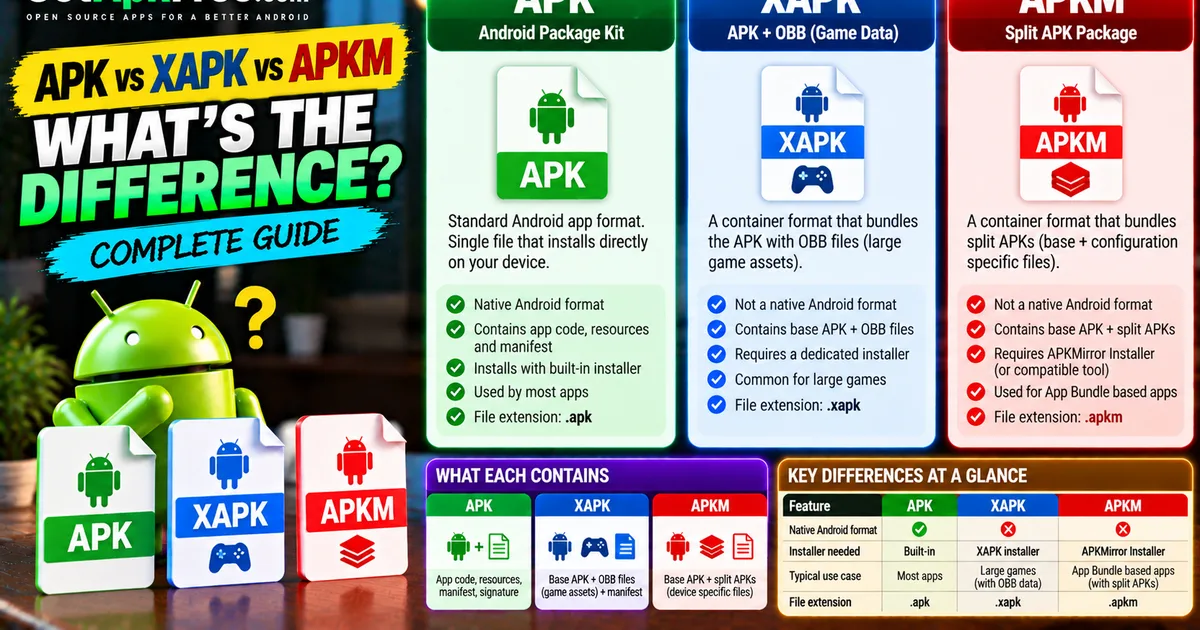
XAPK is a container format, not something Android understands natively. An .xapk file is essentially a zip archive that can contain:
- The app's base APK
- Additional resource files, most commonly OBB files — large asset packs (textures, audio, level data) that some games store separately from the app code itself, because Android's OBB system is built for exactly that
- A manifest describing how the pieces fit together
The format was popularized by third-party app catalogues, XAPKPure and similar sites among them, specifically to solve a real problem: some Android apps — usually large games — are too big or too structurally split for a single APK file to represent cleanly, especially when they rely on OBB expansion data that has to land in a specific device folder to work.
Because .xapk isn't a format Android's built-in installer recognizes, installing one requires a dedicated installer app rather than a simple tap.
What Is an APKM?
APKM is a related but distinct format, associated specifically with the APKMirror Installer app. An .apkm file is also a zip-based container, but instead of bundling OBB data, it typically bundles split APKs.
Split APKs are the mechanism behind Android App Bundles — instead of shipping one monolithic APK with every resource for every device configuration, a developer can publish a base APK plus separate "split" APKs for things like specific screen densities, CPU architectures, or languages. The Play Store already does this kind of splitting behind the scenes for App Bundle-based apps; APKM packages the same idea into a single downloadable file so it can be installed outside the Play Store.
Like XAPK, an .apkm file isn't something the standard Android installer opens on its own — it needs the app associated with that format to unpack and install it correctly.
APK vs XAPK vs APKM: A Direct Comparison
| APK | XAPK | APKM | |
|---|---|---|---|
| Native Android format | Yes | No | No |
| Typically contains | A single app package | Base APK + OBB / extra resources | Base APK + split APKs |
| Installer needed | Android's built-in installer | A dedicated XAPK-capable installer | The APKMirror Installer app (or compatible tool) |
| Common use case | Most apps | Large games with separate asset data | Apps published as Android App Bundles |
| File extension | .apk |
.xapk |
.apkm |
None of these formats is inherently "better" than the others — they solve different packaging problems. Whether a given app needs XAPK, APKM, or a plain APK depends on how that specific app was built and published, not on which format is generally superior.
Why Do XAPK and APKM Files Exist?
Both formats exist because a single APK file doesn't always cleanly represent how a modern app is built and distributed.
- Large games often separate their code from their asset data (textures, audio, video), and Android's OBB system was designed for exactly that split. XAPK packages the APK and its OBB data together so you don't have to manually place files in the right folder.
- Android App Bundles, the format Google now recommends developers use for the Play Store, split an app into a base package plus configuration-specific pieces. When a third-party site wants to offer that same App Bundle outside the Play Store, APKM is a way to package all the required split APKs into one downloadable file.
In both cases, the container format is a workaround for distributing something outside the ecosystem it was originally built for — not a sign that anything is wrong with the app itself.
Which Format Should You Install?
In practice, you don't usually get to choose — the format is whatever the source you're downloading from provides for that particular app. A few things worth keeping in mind either way:
- If the app is on the Play Store, use the Play Store. It handles App Bundles, split APKs, and asset delivery automatically, with no manual packaging step and no need to think about file formats at all.
- If you're installing outside the Play Store, whatever format the developer or an authorized distributor provides is the right one to use — there's no advantage to seeking out a different format for the same app.
- Compatibility, not format, is what actually matters. An
.xapkwith OBB data won't help you if the underlying app doesn't work on your device; a plain APK won't magically avoid needing extra resources if the app genuinely requires them. - Whenever there's a choice, prefer Google Play, the developer's own site, or another source you're confident is authorized, rather than picking a format based on convenience alone.
How to Install an APK Safely
Since a plain APK is the format Android understands natively, installing one is the simplest of the three:
- Download the APK from a source you trust — the developer's site, F-Droid for open-source apps, or a catalogue that scans what it hosts.
- Open the file from your Downloads or Files app.
- If prompted, allow installs from that specific app (your browser or file manager) under Settings → Apps → Special app access → Install unknown apps — grant it only to the app you're actually using, not broadly.
- Review the permissions screen, then tap Install.
For a fuller walkthrough of Android app installation, including troubleshooting steps, see our guide on how to install APK files on Android safely, or the shorter quick install walkthrough.
How XAPK Installation Differs From APK Installation
Because Android's installer doesn't recognize .xapk files directly, the process has an extra step compared to a plain APK:
- Install an XAPK-capable installer app first — the tool associated with whatever site provided the file. Get that installer itself from an official source rather than a random mirror.
- Open the
.xapkfile with that installer instead of the system package installer. - The installer unpacks the base APK and the OBB data, places the OBB files in the correct device folder, and installs the app.
- Grant the same "install unknown apps" permission the installer needs, the same way you would for a plain APK.
The result — the installed app — behaves identically to one installed from a plain APK. The XAPK format only changes how the pieces get onto your device, not what runs once installation finishes.
How APKM Installation Differs From APK Installation
APKM installation follows a similar pattern to XAPK, but is tied specifically to the APKMirror Installer:
- Install the APKMirror Installer app (or another tool explicitly built to handle
.apkmfiles). - Open the
.apkmfile with that installer. - The installer extracts the base APK and the relevant split APKs for your device — matching things like your device's architecture and screen density — and installs them together as a single app.
- As with any sideloaded install, you'll need to allow installs from that installer app if you haven't already.
Once installed, an app delivered via APKM is functionally the same app you'd get through the Play Store's own App Bundle delivery — the split-APK mechanism is the same idea, just packaged for manual installation.
Common Installation Problems and Fixes
A few issues come up more often with XAPK and APKM files than with plain APKs, precisely because there's an extra unpacking step involved:
- "Installer not found" or the file won't open. You need the specific installer app associated with the format — a plain file manager or the system installer won't recognize
.xapkor.apkmon its own. - Missing OBB data after installing an XAPK. If the installer didn't have permission to write to the right storage location, the app may launch but fail to load game assets. Re-run the install and confirm the installer has the storage access it asked for.
- "App not installed" on an APKM. This is usually the same signature-mismatch issue that affects plain APKs — an existing install from a different source conflicts with the one you're installing. Uninstalling the existing version first (after backing up anything you need) usually resolves it.
- Split APKs failing to match your device. If an APKM package doesn't include a split for your specific device configuration, installation can fail outright. There's no fix beyond getting a package that actually covers your device — trying to force a mismatched split is not something you should attempt.
- Storage space. XAPK and APKM installs often need more temporary free space than a plain APK, since the installer unpacks the archive before installing. Free up space if installation stalls partway through.
How to Check Whether an APK, XAPK, or APKM File Is Trustworthy
The verification habits are the same regardless of format — the extra packaging doesn't change what you should be checking:
- Check the source first. Prefer the developer's own site, an official distributor, or a catalogue that publishes scan results, over an anonymous download link.
- Match the app you expect. The package name and publisher should be consistent with what you already know about the app, especially if you're updating an existing install.
- Be cautious of "modded" or unlocked paid apps in any format. A cracked APK, XAPK, or APKM is still a cracked package — the extra container doesn't make it any safer, and paid apps should come from a source you're actually authorized to use, like the Play Store or the developer directly.
- Scan before installing when you're unsure. Google Play Protect scans sideloaded apps on most devices regardless of format, and a multi-engine scanner is a reasonable extra check for anything from a less-established source.
- Only install the installer app itself from a source you trust, since both XAPK and APKM installation depend on a separate tool having broad access to install other apps on your behalf.
Frequently Asked Questions
Is XAPK the same as APK? No. An APK is a single, native Android package. An XAPK is a container that typically bundles a base APK together with additional resources such as OBB data, and requires a separate installer app to unpack and install.
Is APKM safe to install?
An .apkm file is a packaging format, not inherently safe or unsafe — the same trust checks that apply to any APK apply here. The main practical difference is that installing one requires the APKMirror Installer or a compatible tool, since Android's built-in installer doesn't read .apkm files directly.
Do I need a special app to install XAPK or APKM files? Yes. Neither format is understood by Android's native package installer. You need an installer app built specifically to handle that format, and that installer itself should come from a source you trust.
What's a split APK? A split APK is one piece of an app that's been divided into a base package plus additional packages for specific device configurations — screen density, CPU architecture, or language, for example. This is the mechanism behind Android App Bundles, and it's what APKM packages are built around.
Which format should I choose if I have the option? You generally don't choose the format independently of the app — use whatever the authorized source actually provides. If an app is available on the Play Store, installing it there avoids the question of file formats altogether.
Can I convert an APK to XAPK or APKM, or the other way around? That's outside the scope of ordinary app installation, and not something this guide covers or recommends attempting for apps you don't have the rights to redistribute.
Final Thoughts
APK, XAPK, and APKM all describe the same underlying thing — an Android app — packaged in different ways for different distribution needs. A plain APK is the native format and the simplest to install; XAPK exists to bundle large asset data alongside the app; APKM exists to bundle split APKs the way the Play Store already does internally.
None of the three is universally the "right" choice — the right one is whichever the app's authorized source actually provides. What matters far more than the file extension is where the file came from, and doing the same basic checks — source, permissions, and a scan when you're unsure — regardless of which format you're looking at.
Related Articles
Roblox Not Loading Games on Android? How to Fix It
Roblox games not loading on Android? Fix endless loading screens, failed connections, and games that close unexpectedly with practical checks for your network.
GetApkFree Team
Reddit Notifications Not Working on Android? How to Fix It
Reddit notifications not working on Android? Fix missing replies, comment alerts, chat notifications, and delayed updates by checking Reddit settings,
GetApkFree Team
Snapchat Camera Not Working on Android? How to Fix It
Is Snapchat’s camera showing a black screen or refusing to take photos on Android? Check camera permissions, update the app, clear its cache, and follow these practical troubleshooting steps.
GetApkFree Team
Pinterest Images Not Loading on Android? How to Fix It
Pinterest images not loading on Android? Fix blank Pins, missing pictures, endless loading, and feed problems with these practical troubleshooting steps.
GetApkFree Team