This article is about
CapCut Premium
capcutdownload.com.pk · Tools
How to Fix CapCut Templates Not Showing on Android
GetApkFree Team
CapCut templates not showing on Android? Find the missing Templates tab, fix an empty template library, check regional availability, and troubleshoot loading issues.
- Source
- Developer
- Package
- CapCut Premium
How to Fix CapCut Templates Not Showing on Android
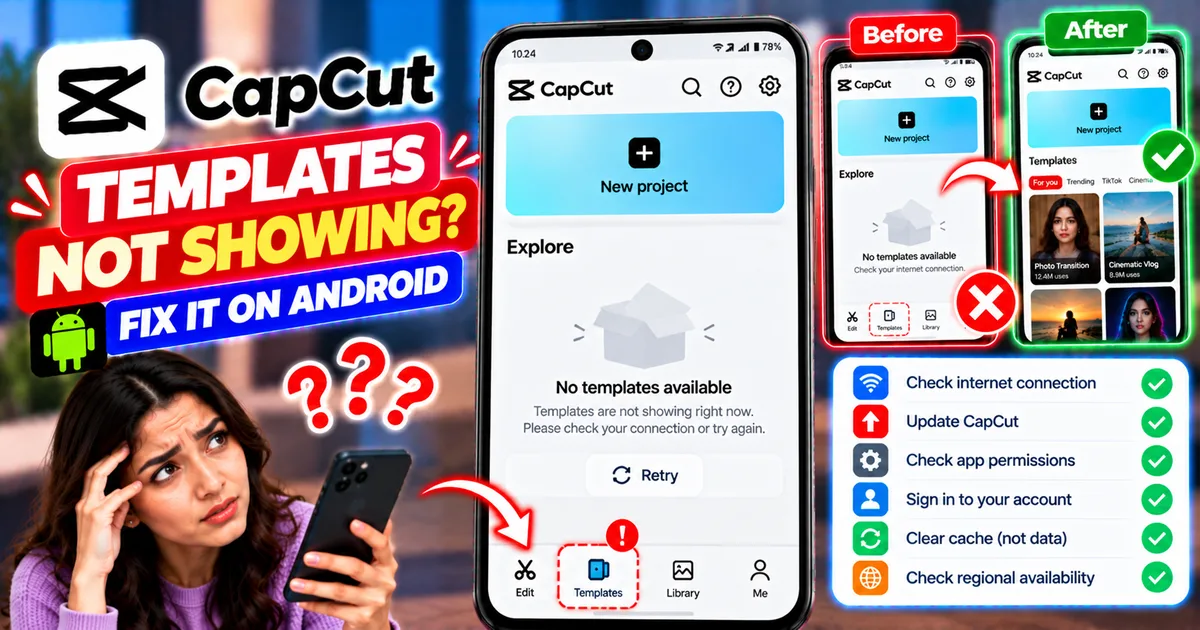
You open CapCut to find a trending video template, but the Templates tab is missing. Perhaps the tab is visible but the template library is completely blank, or you can see only a few templates instead of the collection you expected.
This problem can make it difficult to create TikTok videos, Instagram Reels, YouTube Shorts, and other videos using ready-made edits.
CapCut templates may be unavailable for several reasons. Your app version, internet connection, account status, region, or the location of the feature in the current interface may affect what you see. A temporary loading problem can also make an online template library appear empty.
The right solution depends on whether the Templates tab is missing, the library is not loading, or only certain templates are unavailable.
This guide explains how to troubleshoot CapCut templates not showing on Android without unnecessarily uninstalling the app or putting your unfinished projects at risk.
Quick Answer: How to Fix CapCut Templates Not Showing
If CapCut templates are missing on your Android phone, try these steps:
- Check the current CapCut home screen and navigation menus.
- Confirm that your internet connection is working.
- Switch between Wi-Fi and mobile data.
- Restart CapCut.
- Check whether you are signed in, if your version requires an account for the feature.
- Clear CapCut's temporary cache.
- Update CapCut through an official source.
- Check whether templates are available in your region.
- Test whether other online CapCut features work.
- Contact CapCut support if the template library remains unavailable.
Important: Do not uninstall CapCut as your first troubleshooting step. Uninstalling can remove local drafts and unfinished projects. Updating the installed app is a safer first option.
Why Are CapCut Templates Not Showing on Android?
Before changing settings, identify what is actually missing.
1. The Templates Tab Is Missing
The app interface may have changed, or the feature may not be available in your current version or region.
Some layouts place features in different sections. The absence of a dedicated tab does not automatically mean that CapCut is broken.
2. The Templates Tab Opens but Shows Nothing
An empty library may indicate a network problem, a temporary loading issue, or unavailable template content.
If other online features are also failing, check your connection before changing other settings.
3. Only Some Templates Are Missing
Individual templates may have been removed, restricted, or made unavailable. Availability can differ by region or account.
If other templates load normally, the issue may be limited to particular content rather than the entire app.
4. Templates Disappeared After an Update
An update may change the interface, navigation, or feature availability. It does not necessarily mean that your templates or drafts have been deleted.
Inspect the updated interface before assuming that the feature has disappeared permanently.
5. You Are Not Signed In
Some templates or related features may require an account. If you are signed out, check whether signing in restores the options available to your account.
However, signing in does not guarantee access to every template.
6. Your Region Does Not Have the Same Template Availability
CapCut states that template availability can vary by region. Some content may not appear even when your app and internet connection are working correctly.
In that situation, clearing the cache or repeatedly reinstalling the app will not necessarily make unavailable templates appear.
Step 1: Find the Templates Section in CapCut
Start by checking whether the feature has moved.
- Open CapCut on your Android phone.
- Return to the main home screen.
- Examine the bottom navigation and other visible menus.
- Look for Templates or a similarly named section.
- If you see a relevant menu, open it and wait for the content to load.
The exact interface can vary by app version, account, and region.
If you cannot find the Templates tab, do not immediately reset the app. Continue with the following steps to determine whether the problem is related to loading, app version, or availability.
Step 2: Check Your Internet Connection
CapCut's template library is an online feature. If the app cannot retrieve the relevant content, the library may appear blank or fail to load.
How to test your connection
- Open a website in your browser.
- Confirm that it loads normally.
- Return to CapCut.
- Open the Templates section again.
- If the library remains empty, switch from Wi-Fi to mobile data or the other way around.
- Retry the feature.
If the template library works on one network but not another, your original connection or its configuration may be contributing to the problem.
For more detailed troubleshooting, see our guide on how to fix CapCut no internet connection on Android.
Step 3: Restart CapCut
A temporary app issue can sometimes prevent interface elements or online content from loading properly.
Follow these steps:
- Close CapCut.
- Open Android's recent-apps screen.
- Swipe CapCut away to close it.
- Open CapCut again.
- Return to the home screen.
- Open Templates and wait for the library to load.
If the templates appear, open one to confirm that the feature is working normally.
If the tab remains missing or empty, continue to the next step.
Step 4: Check Whether You Are Signed In
Some template features may depend on your account or sign-in status.
- Open CapCut.
- Go to your profile or account section.
- Check whether you are signed in.
- If you previously used an account, confirm that you are using the intended one.
- If you are signed out, sign in through CapCut's normal process when appropriate.
- Return to Templates and test again.
Do not repeatedly switch accounts without a reason. If the feature is unavailable because of regional restrictions or another service-side limitation, changing accounts may not solve the problem.
Step 5: Clear CapCut's Cache
Temporary cached data can sometimes contribute to display or loading issues.
On many Android phones, you can clear an app's cache through Settings.
- Open Android Settings.
- Select Apps or Applications.
- Find CapCut.
- Open Storage or Storage and cache.
- Select Clear cache.
- Reopen CapCut.
- Check the Templates section again.
Menu names vary depending on your phone manufacturer and Android version.
Choose Clear cache, not Clear storage or Clear data. Clearing app data is a different operation and may remove locally stored application information. It is not a necessary first step for a missing template library.
Clearing cache may help with temporary issues, but it cannot restore content that is unavailable in your region or has been removed.
Step 6: Update CapCut
An outdated app version may have a different interface or encounter problems loading certain features.
To check for an update:
- Open Google Play Store if you installed CapCut from there.
- Search for CapCut.
- Open the official app listing.
- Check whether an update is available.
- Install the update if appropriate.
- Reopen CapCut and inspect the Templates section.
If you installed the app through another legitimate distribution channel, check that source for a compatible official update.
Avoid uninstalling the app before updating it. If you have unfinished edits, protect your local drafts before making major changes to the installation.
An update may fix an app issue, but it cannot guarantee that all templates will become available.
Step 7: Check Whether Templates Are Available in Your Region
CapCut's official guidance identifies regional availability as one possible reason templates do not appear.
If your app, account, and internet connection are working but the template library remains limited, regional availability may be relevant.
How to investigate
- Check CapCut's official Help Center for current template availability guidance.
- Review any messages shown inside the app.
- Determine whether the problem affects all templates or only certain ones.
- Check whether the feature is officially available in your location.
Do not assume that every missing template can be restored by changing phone settings.
Also avoid unofficial modified applications or unknown downloads that claim to unlock all templates. They can introduce security risks and may not provide the feature you want.
Step 8: Check Whether Other Online Features Work
Testing another online feature can help narrow down the cause.
For example, check whether CapCut can load other online content available in your version.
- If several online features fail, investigate your connection and the app's general loading behavior.
- If other online features work but Templates does not, the problem may be specific to the template library, its availability, or its interface.
- If only one template is missing, the individual template may no longer be available.
This distinction helps prevent unnecessary troubleshooting.
Step 9: Check the Current CapCut Interface After an Update
If the Templates tab disappeared after an update, explore the current interface before attempting more disruptive fixes.
- Open the home screen.
- Examine the available navigation options.
- Check relevant menus and sections.
- Look for any in-app explanations about feature availability.
- Consult CapCut's official Help Center if the layout is unclear.
Do not assume that a feature has been permanently removed simply because its previous location has changed.
CapCut may adjust the interface between versions, and the options displayed can vary by platform and region.
Step 10: Try a Template Link If You Have One
If the template library is missing but someone has shared a template link with you, you can test whether that specific link opens.
Open the link on your Android phone and see whether CapCut launches the intended template.
The result can help distinguish a missing library from a problem with a particular shared link.
If the link itself does not open correctly, follow our separate guide on how to fix a CapCut template link not opening on Android, if that article is available on GetAPKFree.
Keep in mind that a working link does not guarantee access to every template. The template may have been removed or may not be available to your account or region.
Step 11: Restart Your Android Phone
If the Templates section remains missing after restarting CapCut and checking the connection, restart your phone.
- Close CapCut.
- Open the power menu.
- Select Restart.
- Wait for Android to start.
- Open CapCut again.
- Check the Templates section.
Restarting the phone may help with temporary system issues, but it will not override regional restrictions or restore a template that has been removed.
Step 12: Contact CapCut Support
If the Templates section remains unavailable after you have checked the interface, connection, account, cache, and app version, contact CapCut through its official Help Center or the support option available in the app.
Include useful details such as:
- Your phone model.
- Your Android version.
- Your CapCut version.
- Whether the Templates tab is missing or the library is blank.
- Whether other online features work.
- Whether the issue began after an update.
- Your general region.
- A screenshot of the missing tab or empty library.
This information can help support determine whether the problem is device-specific, related to the app version, or caused by feature availability.
Do not share passwords or verification codes with anyone claiming to restore missing templates.
What Not to Do When CapCut Templates Are Missing
Some common troubleshooting attempts can waste time or put your editing work at risk.
Do Not Uninstall CapCut Immediately
Uninstalling may remove local drafts. Try updating, restarting, and checking the cache first.
Do Not Clear App Data Without a Reason
Clearing storage or data is different from clearing cache. It can remove locally stored application information and is not a guaranteed fix for missing templates.
Do Not Assume Every Template Is Available Everywhere
Template availability can vary by region and app version. A missing template may not indicate a problem with your phone.
Do Not Install Unofficial Modified Versions
Unknown modified APKs may introduce malware, privacy risks, or unstable behavior. Use trusted distribution sources and official guidance.
Do Not Keep Repeating the Same Fix
If a different template loads normally but one specific template does not, focus on that template's availability rather than repeatedly clearing the cache.
How to Prevent CapCut Template Problems
Keep CapCut Updated
Check for updates through an official source when the interface or online features stop working.
Maintain a Reliable Connection
A stable internet connection can help online templates load correctly.
Protect Your Drafts
Keep original media and export important finished videos. If you rely on local drafts, avoid unnecessary app-data clearing or uninstallation.
Use Official Sources
Use CapCut's official Help Center and legitimate app distribution channels when checking feature availability or troubleshooting.
Understand Regional Limitations
If certain templates are unavailable in your region, local cache or storage changes may not resolve the issue.
Frequently Asked Questions
Why is the Templates tab missing in CapCut?
Possible reasons include a changed interface, an outdated app version, regional availability, or a temporary app problem. Check the current home screen, update CapCut, and review its official availability guidance.
Why is my CapCut template library blank?
A blank library may be caused by a network problem, temporary loading issue, or unavailable content. Test your connection, restart CapCut, and check whether other online features work.
Does CapCut remove templates?
Individual templates may become unavailable if they are removed, restricted, or otherwise no longer accessible. A missing template does not necessarily mean that your entire template library is broken.
Can I get CapCut templates back by clearing cache?
Clearing cache may help resolve certain temporary loading or display issues, but it cannot guarantee that templates will return. It will not override regional restrictions or restore removed content.
Do I need to sign in to see CapCut templates?
Account requirements can vary by feature and version. If you are signed out, check whether signing in restores the available options, but remember that sign-in does not guarantee access to every template.
Why are CapCut templates available on my friend's phone but not mine?
The two phones may be using different app versions, accounts, regions, or network connections. Compare these factors before assuming your phone is faulty.
Will reinstalling CapCut fix missing templates?
Not necessarily. Reinstallation may remove local drafts and does not guarantee that missing templates will become available. Try less disruptive troubleshooting first.
Can I use CapCut templates if the Templates tab is unavailable?
You can check whether a shared template link works on your Android phone, but availability is not guaranteed. If the template or feature is unavailable to your account or region, the link may not work either.
Final Thoughts
If CapCut templates are not showing on Android, first determine whether the tab is missing, the library is blank, or only certain templates are unavailable.
Check the current interface, internet connection, account status, cache, and app version before considering more disruptive changes. If only specific templates are missing, they may no longer be available to you.
Regional and feature availability can also affect what CapCut displays. If the problem continues after the basic checks, consult CapCut's official Help Center or contact support.
Most importantly, protect your unfinished projects while troubleshooting. You should not need to risk your local drafts just to investigate a missing template library.
Related Articles
Truecaller Caller ID Not Showing on Android? How to Fix It
Truecaller Caller ID not showing on Android? Fix missing caller names and caller ID pop-ups by checking permissions, display-over-other-apps settling
GetApkFree Team
Gemini App Not Working on Android? How to Fix It
Gemini not working on Android? Fix “Something went wrong” errors, failed prompts, endless loading, and app problems with practical checks for your connection, app updates, cache, and Google account.
GetApkFree Team
Canva App Keeps Crashing on Android? How to Fix It
Canva keeps crashing, freezing, or closing unexpectedly on Android? Troubleshoot app updates, Android System WebView, internet problems, storage, cache, and device settings with these practical fixes.
GetApkFree Team
ChatGPT App Login Error on Android: How to Fix “Something Went Wrong”
Getting a “Something went wrong” error when logging in to ChatGPT on Android? Check Google Play Store updates, browser sign-in settings, connectivity, and other safe troubleshooting steps.
GetApkFree Team