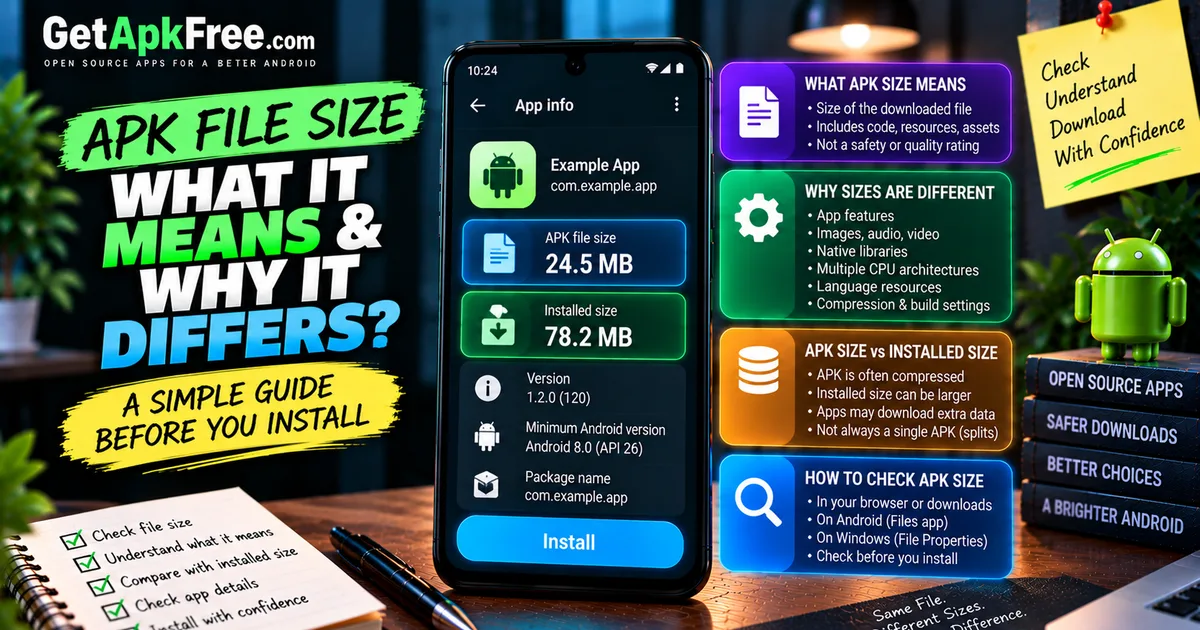
How to Check APK File Size Before Installing: What It Tells You
GetApkFree Team
Learn how to check an APK file's size before installing, what APK size can tell you, why sizes vary, and when an unusually large or small APK deserves attention.
Quick Answer
Learn how to check an APK file's size before installing, what APK size can tell you, why sizes vary, and when an unusually large or small APK deserves attention.
You're about to install an APK and notice the file is 4 MB, or maybe 400 MB — either way, it raises a question: is that normal? APK file size is easy to check and genuinely worth a glance, but it's also easy to misread. A big file isn't automatically bloated or suspicious, and a small one isn't automatically safe. This guide covers what APK size actually measures, why it varies so much between apps, how to check it before you install anything, and what it does — and doesn't — tell you about the app inside.
What APK File Size Actually Means
An APK's file size is simply the size of that specific package — the bytes that make up the file you downloaded or are about to install. It's a straightforward, measurable fact about the file itself: code, resources, images, and everything else bundled into that package, added together. It is not a rating, a safety score, or a quality measurement. It just tells you how large the file is, in the same way a file size tells you that about any other download — a PDF, a video, a spreadsheet — nothing more specific to APKs than that.
Why APK Sizes Are Different
Two apps that do similar things can have wildly different file sizes, for reasons that have nothing to do with which one is "better":
- App functionality — an app with more features generally has more code and more resources to package.
- Bundled resources — images, audio, video, fonts, and other assets add up quickly, especially at high resolution.
- Native libraries — code compiled for specific processors can be a significant part of an APK's size.
- Supported CPU architectures — an APK built to run on several processor types at once bundles code for each one.
- Language resources — an app translated into many languages carries text and sometimes audio for each of them.
- Compression and build configuration — how a developer packages and compresses the app affects the final size, independent of what the app actually does.
- APK variant — some apps are distributed in multiple versions with different feature sets or targeted at different devices.
None of these factors say anything about whether an app is well-made or trustworthy — they're just practical reasons file sizes vary.
APK Size vs Installed App Size
It's worth being clear that download size and installed size aren't the same number, and they don't have to match closely. The APK is often compressed, so unpacking it during installation can produce a larger footprint on your device than the file itself. Installed apps can also download additional data after their first launch, generate cached files, or store data that never existed in the original package at all. Checking an APK's file size tells you about the download — it's a reasonable starting point, but not a guarantee of how much storage the app will actually use once it's set up and running.
It's also worth knowing that modern Android apps aren't always distributed as one single APK. App bundles and split APKs let a single application be delivered as several files — one for your device's architecture, one for your language, and so on — so the size of any one file you're looking at may represent only part of the full installed application, not the whole thing. If you're comparing a single APK's size against what an app store lists for "installed size," you may be looking at two different measurements of two different things, not a discrepancy worth worrying about.
How to Check an APK's Size Before Installing
You don't need to install a file to see how large it is — this is available before you commit to anything, whether it's still sitting in your downloads or on your computer.
In Your Browser or Download Interface
Most browsers show a file's size somewhere in the download process — during the download itself, or in the browser's own downloads list afterward. This is often the fastest way to check, since you don't need to leave the browser or open a separate app.
On Android
Once a file has finished downloading to your device:
- Open your file manager or Files app.
- Navigate to where the APK is saved — usually a Downloads folder.
- Tap and hold the file, or look for a details/info option, depending on your file manager.
- The file's size should be shown alongside other details like the date it was saved.
Exact steps and wording vary between file manager apps and Android versions, but nearly all of them expose a file's size somewhere in its details.
On Windows
If you downloaded the APK to a PC before transferring it to your phone:
- Open File Explorer and locate the file.
- Right-click it and choose Properties.
- The General tab shows the file's size directly.
You can also just view the file list in Details view, which typically shows a size column for every file without needing to open Properties individually.
Checking the file this way — rather than relying only on what an app store or download page claims — also connects to the broader habit of confirming a file's version and package details before installing anything you weren't already certain about.
What a Large APK Can Mean
An unusually large APK, compared to similar apps, generally comes down to a handful of ordinary explanations:
- More bundled resources — high-resolution images, audio, or video included directly in the package.
- Native libraries for multiple processors — a universal build that works across different device architectures at once.
- A broader feature set — more functionality generally means more code and assets.
- The specific variant you downloaded — some builds intentionally include more than others, covered further below.
A large file size on its own is not a reason to assume something is wrong. It's a prompt to check why it's large, not a verdict.
What a Very Small APK Can Mean
A surprisingly small APK is just as explainable:
- Fewer bundled resources, with more content or media delivered separately after install.
- A smaller, more focused feature set by design.
- A different variant — one built for a specific architecture rather than several at once.
- A minimal or lightweight build, which some developers offer deliberately alongside a fuller version.
As with a large file, a small one isn't automatically a red flag, and it isn't automatically a sign of a "leaner, better" app either. It just means less was packaged into that particular file.
Universal APK vs Variant Size
Some apps offer more than one APK for the same release — commonly a universal build that includes support for every architecture, alongside smaller variants built for just one. Understanding ARM64 vs ARMv7 and similar architecture differences explains why a variant matched to your specific device can be noticeably smaller than a universal one covering every device at once, without either version being more or less legitimate than the other. Comparing sizes across different variants of the same app isn't really an apples-to-apples comparison unless you know which variant each one actually is.
Does APK Size Tell You if an APK Is Safe?
No. File size doesn't prove an APK is safe, legitimate, malware-free, or the genuine official release — and it doesn't prove the opposite either. Size is just one attribute of a file, unrelated to who built it, whether it's been modified, or what it actually does once installed. Treating a large file as suspicious, or a small one as automatically clean, isn't a reliable way to evaluate anything.
What to Check Alongside APK File Size
File size is one small piece of a larger picture. Worth checking alongside it:
- Package name and app identity.
- Version name and version code, where available.
- Android compatibility — see our guide on checking APK compatibility.
- CPU architecture or variant, since this directly affects expected size.
- Signing identity, when authenticity genuinely matters — our guide on what an APK signature is covers this in more depth.
- Requested permissions — our guide on checking an APK's permissions walks through what to look for.
- The source the file came from.
None of these signals is conclusive alone. Together, they give you a far more useful picture than file size by itself ever could.
A Simple APK Size Checklist Before Installation
- Check the file's size before installing, using your browser, file manager, or File Explorer.
- Ask whether the size is reasonable for what the app actually does.
- Remember that download size and installed size aren't the same thing.
- Consider whether you're looking at a universal build or a specific variant.
- Compare size alongside package name, version, compatibility, permissions, and signature — not as a standalone check.
- Treat an unusual size as a prompt to look closer, not a conclusion on its own.
Frequently Asked Questions
Does APK file size matter? It's useful context, but not a deciding factor on its own — it's worth knowing, not worth over-interpreting.
Can APK size tell me if an APK is safe? No. Size says nothing about who built the file, whether it was modified, or what it does. Safety depends on the source, signature, and other checks, not file size.
Why are two APK files for the same app different sizes? Different variants, different bundled resources, different supported architectures, or different versions can all produce different sizes for what is otherwise the same app.
Is APK size the same as installed app size? Not necessarily. The installed footprint can be larger than the downloaded file once it's unpacked, and can grow further as the app downloads more data or stores its own files.
Can I check an APK's size without installing it? Yes. Your browser's download list, your phone's file manager, or File Explorer on a PC will all show a file's size without installing anything.
Final Thoughts
APK file size is easy to check and worth a quick glance, but it answers a narrower question than it seems to: how big is this file, not whether it's good or safe. Sizes vary for ordinary, explainable reasons — features, bundled resources, architecture, variant — and neither a large nor a small file deserves an automatic verdict. Check it alongside the package name, version, compatibility, permissions, and signature, and you'll have a genuinely useful picture instead of a single number doing more work than it can actually support.
Related Articles
Roblox Not Loading Games on Android? How to Fix It
Roblox games not loading on Android? Fix endless loading screens, failed connections, and games that close unexpectedly with practical checks for your network.
GetApkFree Team
Reddit Notifications Not Working on Android? How to Fix It
Reddit notifications not working on Android? Fix missing replies, comment alerts, chat notifications, and delayed updates by checking Reddit settings,
GetApkFree Team
Snapchat Camera Not Working on Android? How to Fix It
Is Snapchat’s camera showing a black screen or refusing to take photos on Android? Check camera permissions, update the app, clear its cache, and follow these practical troubleshooting steps.
GetApkFree Team
Pinterest Images Not Loading on Android? How to Fix It
Pinterest images not loading on Android? Fix blank Pins, missing pictures, endless loading, and feed problems with these practical troubleshooting steps.
GetApkFree Team