What Is an APK Version Code? Version Name vs Version Code Explained
GetApkFree Team
Learn the difference between APK version name and version code, how Android uses them, and why version codes matter when checking APK updates and compatibility.
Quick Answer
Learn the difference between APK version name and version code, how Android uses them, and why version codes matter when checking APK updates and compatibility.
Open an app's details and you'll usually see a version number like "5.2.1" — but that's not actually the number Android uses to decide whether one release is newer than another. That job belongs to something called the version code, a separate value most users never see directly. Understanding the difference matters more than it sounds: it explains why two APKs with similar-looking version numbers can behave differently when you try to install one over the other, and why relying on the visible label alone can sometimes leave you guessing about which file is actually the more current one.
What Is an APK Version Name?
The version name is the human-readable label you're used to seeing — something like 1.0, 2.5.1, or 10.4.0. A developer chooses this format entirely on their own; there's no universal rule requiring three numbers, semantic versioning, or any particular style. Some apps stick to simple whole numbers, others use elaborate schemes with build metadata, codenames, or dates attached. The version name exists for people, to communicate roughly how far along a release is and to give users something recognizable to talk about — it isn't a safety rating, and it isn't something Android's package manager relies on to make update decisions.
What Is an APK Version Code?
The version code is a separate, internal numeric identifier tied to that same release, used by Android and package-management tools to distinguish one build from another. Unlike the version name, it isn't meant to be human-friendly — it exists purely so the system has a reliable, always-comparable number to check when deciding whether an incoming package represents a newer release than what's already installed.
Version Name vs Version Code
Consider an example:
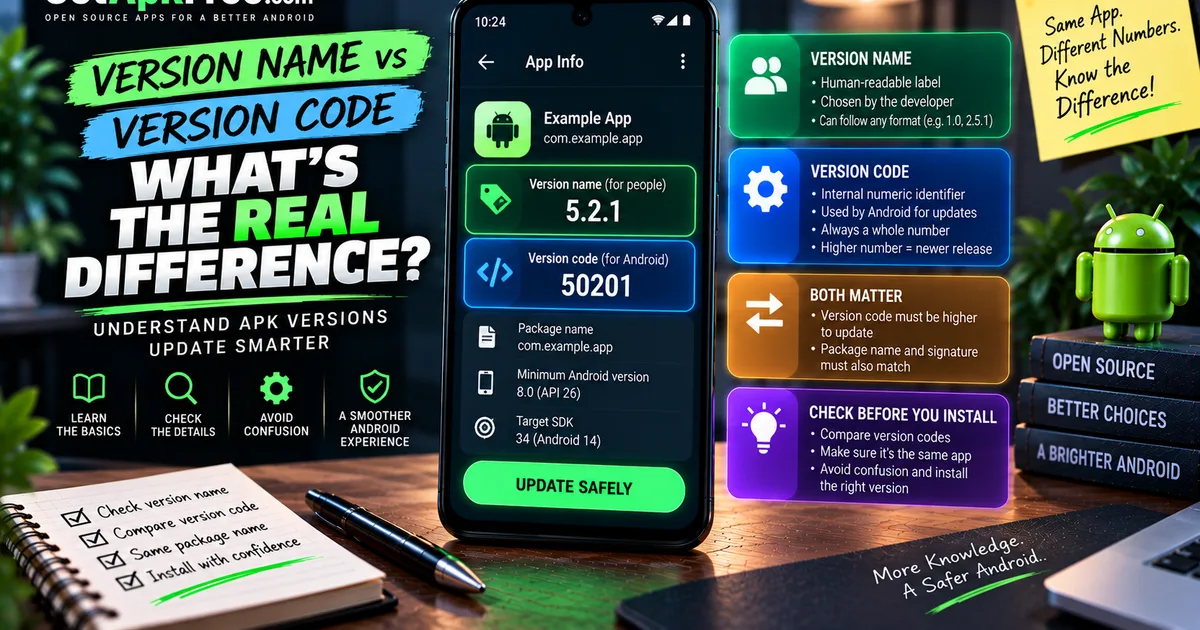
Version name: 5.2.1
Version code: 50201
At a glance, these look related — and for this particular app, the developer chose to make them line up. But that's a stylistic choice, not a requirement. Nothing forces a version code to resemble its version name at all; a developer could just as easily use a plain incrementing sequence — 41, 42, 43 — regardless of how the version name reads, or reset their numbering scheme entirely between major releases. The two numbers serve different audiences: the version name is for people, the version code is for the system, and you shouldn't assume one can be inferred from the other just because they sometimes appear to match.
Why Android Uses Version Codes
Android needs an unambiguous way to compare releases that doesn't depend on parsing a string a developer wrote by hand. Version names are flexible enough that comparing them reliably as text is genuinely difficult — is "2.10" newer than "2.9"? A human reads that correctly; naive text sorting often doesn't, since "2.10" can sort before "2.9" character by character. A version code sidesteps the whole problem: it's a plain integer, and comparing integers is unambiguous regardless of how many digits either one has. That reliability is exactly why the system leans on it internally rather than the label you actually see.
How Version Codes Affect APK Updates
For an ordinary update, Android checks whether the incoming package's version code is higher than what's currently installed — that's the mechanism behind updating an app in place rather than installing it as something separate. But a higher version code alone doesn't guarantee an install will succeed as an update. Android also checks that the package name matches and that the new file's signing identity is compatible with what's already there; a mismatch on either front blocks the install regardless of what the version code says. Our guide on APK updates vs new installs covers how those pieces fit together in more detail. Version code ordering is necessary for an update to proceed — it isn't the only requirement, and treating it as the sole deciding factor is a common source of confusion when an install doesn't behave the way someone expected.
Example: Comparing Two APK Releases
Say you're looking at two files for what appears to be the same app:
APK A — Version name: 4.2.0, Version code: 40200
APK B — Version name: 4.2.1, Version code: 40201
Here, both numbers agree: APK B has the higher version code and the higher-looking version name, so it's reasonably a newer release of APK A. But version names alone can mislead you in other situations — imagine a case where a developer's later release used version name "4.2.0-fix" while an earlier one was labeled "4.2.0." Visually, you can't tell which came first from the name alone. The version code is what actually settles it, which is exactly why it's worth checking rather than trusting the label at a glance, especially when comparing files from a source that isn't a single trusted app listing.
Version Code and Package Name: What's the Difference?
It's easy to conflate these, but they answer different questions entirely. The package name identifies which application you're looking at — a fixed identifier like com.example.app that stays tied to that app's identity. The version code identifies which release of that application a specific file represents. One tells you what the app is; the other tells you where in its release history this particular build sits. You need both to fully understand a file: the package name confirms identity, the version code tells you how current it is relative to other releases of that same package.
Version Codes and APK Variants
Some apps distribute more than one APK for what's nominally the same release, split by factors like CPU architecture, minimum Android version supported, screen or device configuration, bundled language resources, or overall distribution strategy. Whether each variant carries a distinct version code, or shares one across the set, depends entirely on how the developer structured their release — there's no fixed rule requiring uniqueness per variant, and different distribution platforms can even handle this differently for the same underlying app. What matters practically is treating variant selection and version compatibility as separate questions: confirming you have a build that's actually appropriate for your device — our guide on checking APK compatibility covers this — matters independently of which version code that build happens to carry.
What Happens When Version Codes Go Backward?
Installing a file with a lower version code than what's already on your device is normally treated as a downgrade, and Android generally doesn't allow it through the standard update path — the system's ordinary behavior is to block it rather than quietly overwrite a newer installation with an older one. This is a deliberate safeguard, not a bug, and it exists precisely because reversing to older app code against newer stored data can cause real problems, from crashes to data the older build simply doesn't know how to read. This guide isn't the place for instructions on working around that protection; the point worth understanding is simply that version-code ordering runs in one direction for a normal update, not that the restriction is arbitrary.
How to Check an APK's Version Code
A few practical ways to see it:
- An APK-information tool that reads a package's manifest directly can display both version name and version code before you install anything — the same kind of inspection covered in our guide on checking an APK's version and package details.
- Android's own app settings, for something already installed, sometimes expose more detail after enabling developer options, though this varies by device and Android release.
- A trusted app listing, when one exists, often states version information you can compare a file against.
Exactly what's visible and where depends heavily on your device and whichever tool you're using — there's no single universal screen for this across every phone.
What Version Information Can — and Cannot — Tell You
Version name and version code tell you about a release's place in an app's history — nothing more. They don't tell you whether an APK is free of anything malicious, whether it's the genuine official build, whether it's been modified since it was built, whether its requested permissions make sense, or whether it's compatible with every possible device. Version data is one piece of metadata among several — useful for understanding a release, but not a substitute for checking the source, the signing identity, or anything else that speaks to authenticity. When that genuinely matters, our guide on what an APK signature is covers a check that goes further than version numbers alone ever can.
Practical APK Version Checklist
- Note both the version name and version code before installing, not just the visible label.
- Don't assume version names sort reliably as plain text.
- Confirm the package name matches the app you actually expect.
- Check that the variant you have suits your device's architecture and Android version.
- Remember a higher version code is necessary for an update, not sufficient on its own.
- Check signing identity when authenticity genuinely matters.
Frequently Asked Questions
What is an APK version code? An internal integer identifier Android uses to distinguish one release of an app from another, separate from the human-readable version name.
Is version code the same as version name? No. Version name is a label a developer chooses for people to read; version code is the number Android's system actually compares.
Does a higher version code mean a newer APK? Generally yes, for releases of the same app — but a higher version code alone doesn't guarantee an update will succeed, since package identity and signing also matter.
Can two APK files have the same version name? Yes. Nothing stops a developer from reusing or misapplying a version name; the version code is the more reliable way to distinguish releases when that happens.
Can I install an APK with a lower version code? Android's standard update path generally blocks this as a downgrade. This guide doesn't cover bypassing that protection.
Does version code prove an APK is safe? No. It only indicates a release's position in an app's version history — nothing about authenticity, modification, or safety.
Final Thoughts
Version name and version code answer two different questions: one is what a developer wants you to see, the other is what Android's system actually relies on internally. Knowing both — and knowing that a higher-looking version name doesn't guarantee a higher version code — helps you make sense of confusing situations, like two files that look similar but behave differently on install. Treat version information as one useful signal among several, alongside the package name, compatibility, and signing identity, rather than a number that settles anything on its own.
Related Articles

Roblox Not Loading Games on Android? How to Fix It
Roblox games not loading on Android? Fix endless loading screens, failed connections, and games that close unexpectedly with practical checks for your network.
GetApkFree Team
Reddit Notifications Not Working on Android? How to Fix It
Reddit notifications not working on Android? Fix missing replies, comment alerts, chat notifications, and delayed updates by checking Reddit settings,
GetApkFree Team

Snapchat Camera Not Working on Android? How to Fix It
Is Snapchat’s camera showing a black screen or refusing to take photos on Android? Check camera permissions, update the app, clear its cache, and follow these practical troubleshooting steps.
GetApkFree Team

Pinterest Images Not Loading on Android? How to Fix It
Pinterest images not loading on Android? Fix blank Pins, missing pictures, endless loading, and feed problems with these practical troubleshooting steps.
GetApkFree Team