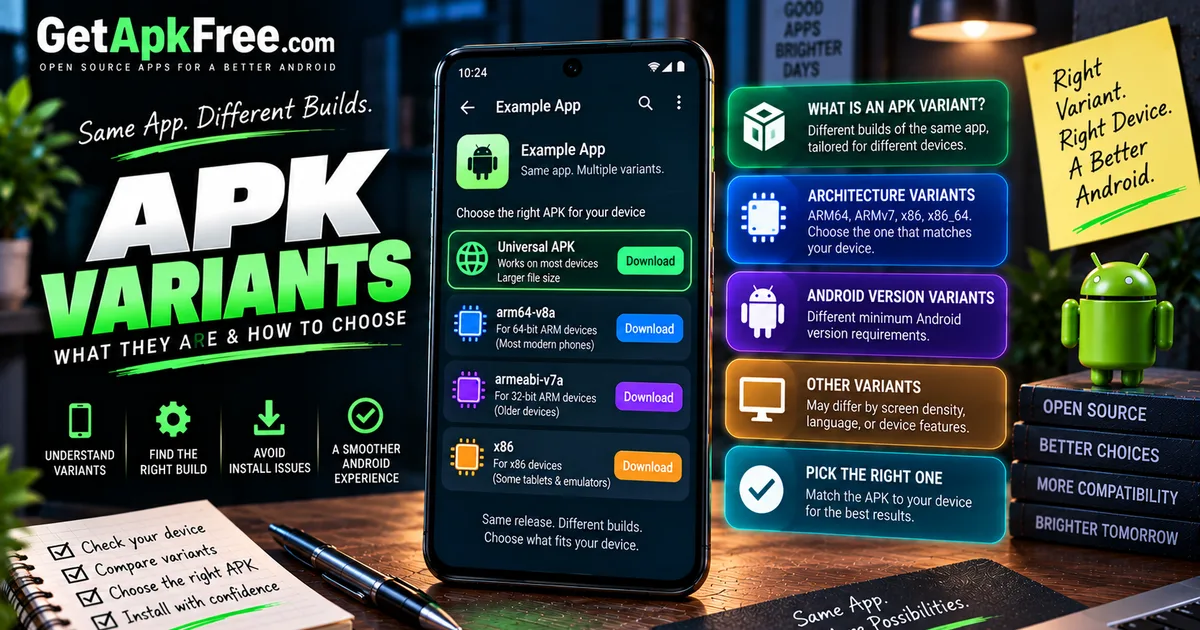
What Is an APK Variant? Universal APK vs Device-Specific APK Explained
GetApkFree Team
Learn what an APK variant is, why Android apps have different APK versions, and how architecture, Android version, language, and device requirements affect APK selection.
Quick Answer
Learn what an APK variant is, why Android apps have different APK versions, and how architecture, Android version, language, and device requirements affect APK selection.
Search for an app and you might find more than one APK offered for the exact same release — one labeled universal, another tied to a specific architecture, maybe a third aimed at older devices. These are variants: different builds of the same app, packaged for different situations. Picking the wrong one doesn't mean you've found a fake app or a bad download — it usually just means the build isn't matched to your device, which is a much more ordinary and easily fixed problem than it might first seem. This guide explains what a variant actually is, the different reasons they exist, and how to choose sensibly between them.
What Is an APK Variant?
An APK variant is one of several APK builds a developer or distributor makes available for the same application release, each tailored to a different set of device requirements. Rather than producing a single file meant to run identically everywhere, a developer can package multiple versions — different architectures, different Android version requirements, different bundled resources — all representing the same underlying app and release. Variants belong to the same release family; they aren't separate apps competing for your attention, just different packagings of one.
Why Do Apps Have Multiple APK Variants?
The core reason is efficiency and reach. A single "do everything for everyone" file can work, but it isn't always the most practical choice — it may need to include support for hardware or configurations most individual users will never touch, inflating the download for no real benefit to most people who install it. Producing variants lets a developer offer something closer to what a specific device actually needs, or alternatively offer one broad file for maximum compatibility at the cost of some extra size. Neither approach is universally correct; it's a tradeoff developers make differently depending on their app, their audience, and how much complexity they're willing to manage across releases.
Universal APK vs Device-Specific APK
A universal APK is built to run on a broad range of devices at once, typically by including support for multiple architectures or configurations in a single file. This generally makes it more likely to work out of the box across different phones, though it doesn't necessarily contain every possible resource the app could ever use — a developer still decides what's worth bundling universally versus leaving out.
A device-specific APK targets a narrower set of devices — commonly a single CPU architecture, or a build intended for a particular class of hardware. It isn't automatically smaller in every case, and it isn't a lesser or incomplete version of the app; it's simply scoped to less hardware diversity than a universal build, which can make it a more efficient match precisely because it doesn't need to carry code and resources your specific device would never use anyway.
Neither type is inherently the "right" choice — it depends on matching the file to your actual device, not on assuming one category is a fundamentally better engineering decision than the other.
Architecture Variants
The most common kind of variant splits by CPU architecture — the instruction set your device's processor actually understands. You'll commonly see references to ARM64 and ARMv7 on phones, and less frequently x86 or x86_64 on some tablets and emulated environments. A build compiled for one architecture generally won't run correctly on hardware built for a different one, which is why developers sometimes ship separate architecture-specific files rather than one file for everyone. Our dedicated guide on ARM64 vs ARMv7 and choosing the right variant covers this specific comparison in depth, so we won't repeat the full explanation here.
Android Version Variants
Separately from architecture, some apps offer builds aimed at different Android version requirements — a newer build that takes advantage of more recent platform features, alongside an older build kept available for devices running older Android releases. Exactly which Android versions are involved changes over time as the platform evolves, so it's not something worth pinning to specific numbers here — the general pattern is what matters: a variant's minimum supported Android version is a real requirement, independent of its architecture, and both need to line up with your device for the app to install and run correctly.
Screen, Language, and Resource Variants
Beyond architecture and Android version, variants can also differ because of screen density or configuration, specific device features an app depends on, bundled language resources, other packaged assets, or simply the distributor's own strategy for organizing releases. Not every app uses all of these — a simple app might only ever ship one universal build, while a more complex one might split along several of these dimensions simultaneously, combining an architecture split with a separate set of language-specific resources. There's no requirement that a given app use any particular variant strategy, and the choice often has more to do with the app's size and audience than with any fixed convention.
APK Variants vs Split APKs
It's worth distinguishing variants from Android's split-APK approach, since they solve related problems differently. A variant is a standalone, independently installable file — you choose one and install it. A split package, by contrast, delivers an app as several files meant to be installed together as a set, each covering part of the whole (a base package plus configuration-specific pieces). Our guide on what a split APK is covers that mechanism specifically. The short version: variants are alternatives you pick between, while splits are complementary pieces meant to combine into one install.
How APK Variants Affect Compatibility
Choosing a variant that doesn't match your device is one of the more common, avoidable causes of installation trouble — an install that fails outright, an app that installs but won't open, or behavior that's subtly broken because a resource the app expected isn't actually present in that build. None of this reflects a problem with the app itself; it reflects a mismatch between the file and the device. Before installing a variant you're unsure about, it's worth working through a proper compatibility check rather than guessing based on the filename alone.
Example: Choosing Between Variants
Say an app offers three files for the same release: an ARM64 build, an ARMv7 build, and a universal build. If you know your phone uses a 64-bit ARM processor, the ARM64 build is the closest match and typically the most efficient choice. If you're not sure, or you're installing across a mix of devices, the universal build removes the guesswork at the cost of a larger download. Picking the ARMv7 build on a phone that's actually ARM64 wouldn't necessarily fail — many ARM64 devices can run ARMv7 code — but it does forgo any benefit the 64-bit-specific build might offer.
A second scenario: two files for the same visible version, one requiring a newer Android release than the other. A user on an older device shouldn't reach for whichever file loads first — the one matching their actual Android version is the one likely to install successfully, regardless of which one appears more prominently in a listing.
Common Misconceptions
A few assumptions worth correcting:
- "Universal APK is always best." It's often the safest default for compatibility, but not automatically superior — a well-matched device-specific build can be just as functional and sometimes more efficient.
- "A smaller APK is worse." Size differences between variants usually reflect what's bundled for that specific hardware, not reduced quality.
- "A different variant means a fake app." Variants of a genuine release are expected to differ from each other — that alone says nothing about legitimacy.
- "Same version name means identical APK." Variants commonly share a visible version name while differing underneath in architecture, resources, or other details.
Version Codes and Variants
Variants can share the same visible version name, since that label is just how a developer describes the release to users. Underneath, version codes may or may not differ between variants — some developers give each variant its own code, others don't — there's no fixed rule requiring every variant to carry a unique one. Our guide on version code vs version name covers how that numbering actually works and why it matters more than the visible label when precision counts.
What APK Variants Can and Cannot Tell You
A variant tells you what hardware or configuration a specific file targets — nothing about whether the app is trustworthy. Variants do not prove safety, and choosing between them isn't a security decision. Whatever variant you land on, it's still worth checking the source you downloaded it from, confirming its package identity, reviewing requested permissions, and — when authenticity genuinely matters — checking its signing identity. None of that changes based on which variant you picked; it applies equally regardless of architecture or configuration.
Practical Variant Checklist
- Identify your device's CPU architecture before choosing an architecture-specific build.
- Check the Android version a variant requires against your device's actual version.
- When unsure, a universal build removes some guesswork, at the cost of a larger file.
- Don't assume a smaller or differently sized variant is lower quality.
- Remember variants can share a version name while differing in version code or content.
- Check source, permissions, and signing identity regardless of which variant you install.
Frequently Asked Questions
What is an APK variant? One of several APK builds offered for the same app release, each tailored to different device requirements like architecture, Android version, or bundled resources.
Is a universal APK better? Not automatically. It's often more broadly compatible, but a matched device-specific build can work just as well and sometimes more efficiently.
Can two APK variants have the same version name? Yes. Variants frequently share a visible version name while differing in architecture, resources, or version code underneath.
Why won't a variant install? Usually a mismatch — wrong architecture, an Android version requirement your device doesn't meet, or a missing resource the build expected.
Are APK variants different apps? No. Variants belong to the same release family as alternative packagings, not separate applications.
Do APK variants prove safety? No. Variant choice is about device compatibility, not authenticity — check the source, permissions, and signature regardless of which variant you use.
Final Thoughts
An APK variant is simply one packaging of a release aimed at a particular set of devices — not a different app, not a sign of anything suspicious, and not a safety indicator either way. Matching a variant to your actual hardware and Android version solves most installation headaches, while decisions about trust — source, permissions, signing — stay exactly the same no matter which variant you end up choosing.
Related Articles
Roblox Not Loading Games on Android? How to Fix It
Roblox games not loading on Android? Fix endless loading screens, failed connections, and games that close unexpectedly with practical checks for your network.
GetApkFree Team
Reddit Notifications Not Working on Android? How to Fix It
Reddit notifications not working on Android? Fix missing replies, comment alerts, chat notifications, and delayed updates by checking Reddit settings,
GetApkFree Team

Snapchat Camera Not Working on Android? How to Fix It
Is Snapchat’s camera showing a black screen or refusing to take photos on Android? Check camera permissions, update the app, clear its cache, and follow these practical troubleshooting steps.
GetApkFree Team
Pinterest Images Not Loading on Android? How to Fix It
Pinterest images not loading on Android? Fix blank Pins, missing pictures, endless loading, and feed problems with these practical troubleshooting steps.
GetApkFree Team