What Is an APK Signature? How Android Uses App Signing
GetApkFree Team
Learn what an APK signature is, how Android app signing works, why signatures matter, and how a signing mismatch can affect APK installation and updates.
Quick Answer
Learn what an APK signature is, how Android app signing works, why signatures matter, and how a signing mismatch can affect APK installation and updates.
If you've ever tried to update an app with an APK and been told installation failed for no obvious reason, the cause is often something you never see directly: a mismatch in the app's signing information. Android signs every package it installs, and that signature quietly governs a lot of what you can and can't do when updating an app manually. This guide explains what an APK signature actually is, why Android relies on it, and what it does and doesn't tell you.
What Is an APK Signature?
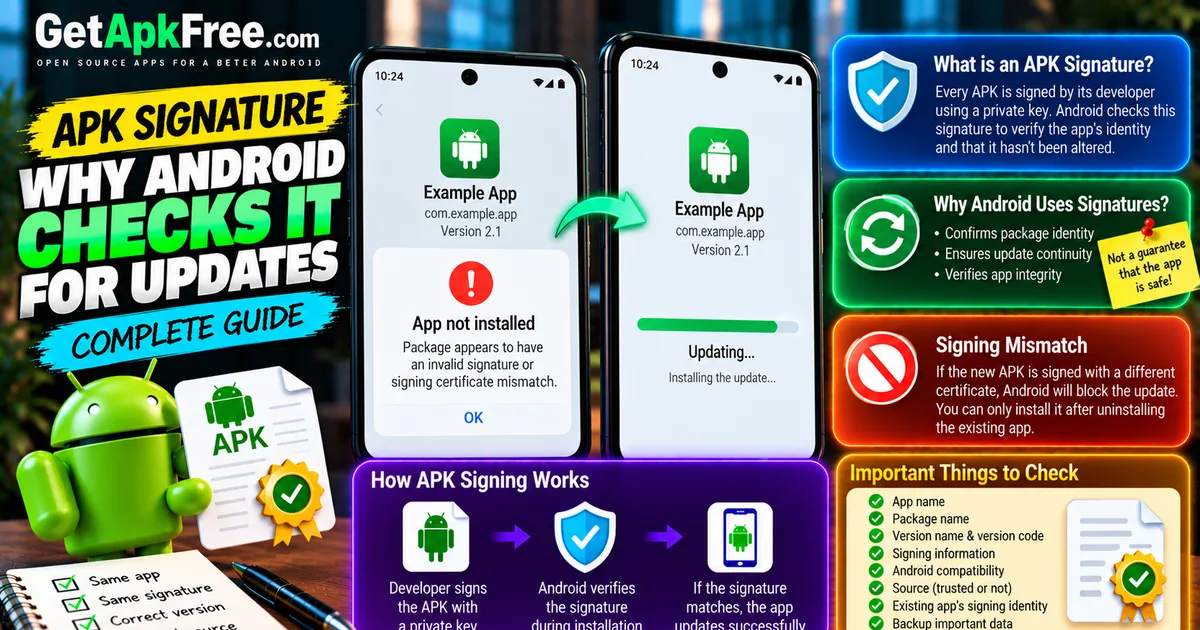
Every APK is cryptographically signed by its developer before it's distributed. That signature is generated from a private key only the developer holds, and Android uses it to establish two things: that the package hasn't been altered since it was signed, and that a given package's identity is tied to whoever holds that key. It's not a visible field you'd normally notice — it's baked into the package and checked automatically whenever Android installs or updates an app.
Why Are Android Apps Signed?
Signing exists to solve a few specific problems, not to certify that an app is good software:
- Package identity — the signature ties a package to the key that produced it, which is how Android distinguishes a legitimate continuation of an app from something else using the same name.
- Update continuity — when you install a new version of an app you have, Android checks that the new package was signed with the same key as the one already installed.
- Integrity — the signature confirms the package's contents match what was signed, so a corrupted or tampered file is detectable.
What signing does not do is vouch for the app's behavior. A signature confirms consistency and origin relative to a key — it says nothing about whether the app itself is well-built, honest, or safe to use.
What Is an Android App Signing Certificate?
The signing certificate is what actually carries the developer's signing identity — practically, it functions as the developer's "signature" across every version of that app they ever release. It's worth being precise about three things that are easy to conflate:
- App name — the display name, like "Example App."
- Package name — the unique identifier, like
com.example.app. - Signing identity — the certificate the developer used to sign the package.
These are three separate properties. An app can keep the same name and package across years of updates while its signing identity stays constant behind the scenes — and it's that third property, not the name or package alone, that Android checks before treating a new file as a legitimate update.
How Does APK Signing Affect App Updates?
Say you have "Example App" (com.example.app) installed at version 2.0, and you've downloaded version 2.1 of what appears to be the same app. Even if the name and package name both look correct, Android will only install 2.1 as an update if it was signed with a compatible signing identity to the version you already have. If it wasn't — say it came from a different distributor who repackaged and re-signed it — Android rejects the install rather than guessing that it's fine. Our guide on APK updates vs new installs covers this mechanism in more detail, including what happens when everything matches correctly.
What Is a Signing Mismatch?
A signing mismatch is exactly this situation: a new APK's certificate doesn't match the one already installed under that package name. In practice, this shows up as an install that simply fails, sometimes with Android reporting a package or signature conflict rather than a specific explanation. The only way past it is to remove the existing installation first, letting the new file install fresh rather than as an update.
That's worth doing deliberately, not automatically — uninstalling can remove local app data depending on the app, so back up anything you'd mind losing before you do it, and only take that step once you're confident the new file is a legitimate build you actually want.
APK Signature vs Package Name
| Package Name | Signing Identity | App Name | |
|---|---|---|---|
| What it identifies | The application/package namespace | Who signed the package | The display name shown to users |
| Example | com.example.app |
A specific developer certificate | "Example App" |
| Can change over time? | No — fixed for the app's life | No — expected to stay consistent | Yes, freely |
| What a mismatch means | Different app entirely | Update blocked; different signing source | Cosmetic only |
Can Two APKs Have the Same App Name but Different Signatures?
Yes. Nothing stops two different packages from displaying the identical name — a name is just a string, chosen by whoever built the app. Two files with the same visible name and even the same package name can still carry different signing identities, which is exactly what Android's signature check exists to catch. Visible names alone are never enough to establish that two files are the same legitimate application; our guide on checking an APK's version, package name, and details covers the other fields worth comparing alongside signing.
Does an APK Signature Prove an APK Is Safe?
No. A signature tells you a package's contents match what was signed and, when checked against an existing install, whether it shares that install's signing source. It says nothing about whether the underlying app is trustworthy, well-behaved, or free of anything you wouldn't want on your device. Signing identity is one piece of a larger picture — our guide on how to tell if an APK is safe covers the source, permission, and scanning checks that actually address that question.
How Can Users Check APK Signing Information?
Some APK-inspection tools can display a package's certificate details — things like the certificate's fingerprint — for anyone who wants to compare two files directly. This is a specialized field most people never look at, and it's distinct from Android's own package installer, which checks signatures automatically without showing you the details. If you do use an inspection tool for this, the same rule applies as anywhere else: get it from a source you already trust, not an unfamiliar app promising deep APK analysis.
Why Does Android Reject an APK With a Signature Conflict?
A handful of everyday scenarios trigger this: installing a build signed by a different certificate than what's already there, trying to replace an app with a version from a different distributor, or switching between an official build and one repackaged by someone else. In every case, Android's response is the same — refuse the install rather than assume the two are equivalent. That refusal is the system doing exactly what it's designed to do, not an error to work around.
How Signing Relates to APK Versions
Version number and signing identity solve two completely different problems. A version code tells Android whether one build is numerically newer than another; signing identity tells Android whether that newer build is allowed to replace what's already installed. A higher version number doesn't override a signing mismatch — both have to check out for an update to go through, and neither one substitutes for the other.
What Should You Check Before Installing or Updating an APK?
- App name
- Package name
- Version name
- Version code, where available
- Developer identity/source
- Android compatibility
- Signing information, where available
- Where the APK came from
- The version you already have installed
- A backup of anything important
No single item on this list guarantees safety on its own — together, they give you a reasonably complete picture before you install anything.
Frequently Asked Questions
What is an APK signature? A cryptographic signature applied by the developer, which Android uses to verify a package's integrity and confirm its signing identity.
Why does Android require APK signing? To establish package identity, confirm update continuity between versions, and detect tampering — not to certify that an app's behavior is safe.
Can I update an app with a different signature? No — Android blocks installs where the new file's signature doesn't match the currently installed app's signing identity.
What does "signature mismatch" mean? It means the APK you're trying to install was signed with a different certificate than the app already on your device, so Android won't treat it as a valid update.
Is an APK signature the same as a package name? No. The package name identifies the app itself; the signature identifies who signed it. They're checked together but represent different things.
Does a valid APK signature mean the APK is safe? No. It confirms identity and integrity relative to that certificate — it says nothing about the app's actual behavior.
Can two APKs have the same app name but different signatures? Yes. Display names are freely chosen and don't guarantee two files are the same legitimate application.
Final Thoughts
APK signing exists to answer a narrow but important question — does this file genuinely continue the same app you already have — not the broader question of whether an app deserves your trust. Understanding that distinction explains why an update can fail even when everything else looks right, and why a valid signature is a useful signal to check alongside the source, permissions, and everything else, rather than a stand-in for all of it.
Related Articles
Roblox Not Loading Games on Android? How to Fix It
Roblox games not loading on Android? Fix endless loading screens, failed connections, and games that close unexpectedly with practical checks for your network.
GetApkFree Team
Reddit Notifications Not Working on Android? How to Fix It
Reddit notifications not working on Android? Fix missing replies, comment alerts, chat notifications, and delayed updates by checking Reddit settings,
GetApkFree Team

Snapchat Camera Not Working on Android? How to Fix It
Is Snapchat’s camera showing a black screen or refusing to take photos on Android? Check camera permissions, update the app, clear its cache, and follow these practical troubleshooting steps.
GetApkFree Team
Pinterest Images Not Loading on Android? How to Fix It
Pinterest images not loading on Android? Fix blank Pins, missing pictures, endless loading, and feed problems with these practical troubleshooting steps.
GetApkFree Team