What Is an APK Package Name? How to Find and Verify It
GetApkFree Team
Learn what an Android APK package name is, why it identifies an app, how to find it, and how to use it when checking APK versions and compatibility.
Quick Answer
Learn what an Android APK package name is, why it identifies an app, how to find it, and how to use it when checking APK versions and compatibility.
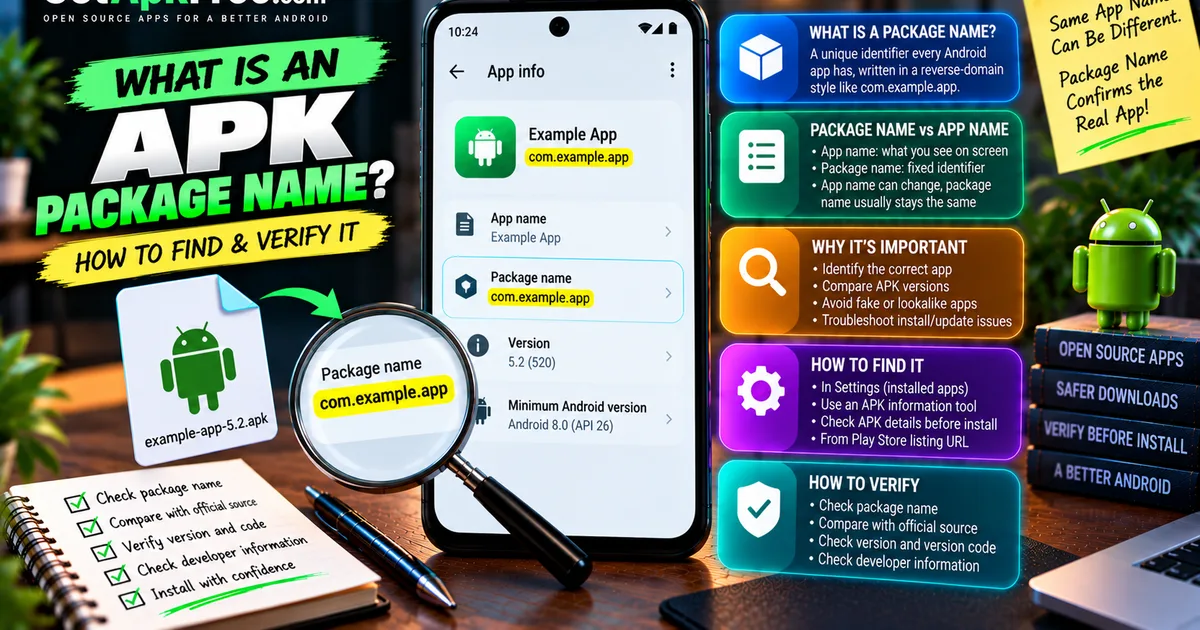
You've got a file called something like example-app-5.2.apk, and it looks like the app you're after — but the filename is just text someone chose, and doesn't confirm which Android application is actually inside. The thing that does is the package name: a fixed identifier Android uses to tell one app from every other app on your device, independent of the filename or what its icon says underneath.
This guide covers what a package name is, how it differs from the app name, and how to find and verify one before installing an APK.
What Is an APK Package Name?
A package name — sometimes called an application ID — is a unique identifier every Android app has, written in a reverse-domain style like:
com.example.app
It looks like a web address read backwards, but it isn't one and doesn't need to resolve to anything online — it's a namespaced string, chosen once by the developer, that Android's package manager uses internally to track which app is which. Two apps can share everything else — icon, display name, description — but not a package name; Android treats it as the definitive answer to "which app is this."
APK Package Name vs App Name
App name is what you actually see — on the home screen, in Settings, in a store listing. A developer can change it freely, for a rebrand, a localization, or a fresh look on a new version. Nothing about that is unusual on its own.
Package name is the underlying identifier Android and app-management tools rely on. It's meant to stay tied to that application's identity for as long as the app exists — so renaming the visible label doesn't turn it into a different app in Android's eyes. That said, it isn't absolute: a developer could ship a genuinely new package name and have Android treat it as an entirely different application, data and update history included. That's a deliberate, disruptive change, not a side effect of an ordinary rebrand.
Why Is the Package Name Important?
- Identifying the correct app, especially among similar or generic-sounding names — two apps called "Photo Editor" look identical until you check underneath.
- Checking APK metadata, since most inspection tools key off the package name as the primary field.
- Comparing APK versions of what should be the same app, before assuming one updates the other.
- Troubleshooting installation or update conflicts, which often trace back to a package-name mismatch you wouldn't otherwise notice.
- Identifying the correct listing when searching for an app's official page or source.
- Checking compatibility information, usually published against a specific package rather than a display name.
How to Find an APK Package Name on Android
Where you find it depends on whether the app is already installed or you're still holding the file.
Method 1: Check Installed App Information
- Open Settings.
- Find Apps (also labeled Apps & notifications or Application manager, depending on the manufacturer).
- Tap the app to open its info page.
- Look for an identifier field — sometimes shown directly, sometimes only after enabling developer options.
Exact wording and location shift between manufacturers and Android releases, so treat this as the general shape rather than an exact match for every phone.
Method 2: Use an APK Information/File Manager Tool
Some file managers and dedicated APK-inspection utilities read a package's manifest directly and display its identifier, version, and permissions without installing it — usually the fastest route if your file manager already has it built in. Choose a tool the same way you'd choose any app you trust with your files.
Method 3: Check APK Details Before Installation
For a file you haven't installed yet, metadata tools can extract the package name from the APK's contents rather than guessing from the filename — which matters, since a filename can say anything. Our guide on checking an APK's version, package name, and other details walks through this in full.
Finding a Package Name From a Play Store Listing
If an app has a Google Play Store listing, its URL typically includes the package name, in a shape like:
play.google.com/store/apps/details?id=com.example.app
The part after id= is the identifier; everything else on the page — title, icon, chosen name — is presentation, not identity. This is useful for looking up an app's real package name before comparing it against a downloaded file, but it confirms what the listing says, not that a particular APK matches it.
How to Verify an APK's Package Name
- Identify the expected application — know which app you actually intend to install.
- Check the APK's package name, using one of the methods above.
- Compare it with the trusted app listing or source you'd expect it to come from.
- Check the version and version code, so you know whether this is the release you think it is.
- Check developer information, where the tool you're using exposes it.
- Check Android compatibility — see our guide on checking APK compatibility.
- Consider the APK signature when authenticity genuinely matters — a matching package name doesn't rule out a re-signed file. Our guide on what an APK signature is covers that check.
None of these alone is proof. Together, a matching package name, a sensible version, and a consistent signature give a reasonably strong picture — but package-name matching specifically is useful evidence, not a complete guarantee.
Why Package Names Matter When Updating an App
When you install a file over an app you already have, Android decides whether that's a genuine update based on application identity — starting with whether the package name matches what's currently installed. That's only part of the picture: Android also checks the file's signing identity and compares version information to decide whether the new file is actually newer.
A matching package name alone doesn't guarantee an APK can update an installed app — if the signing identity doesn't also match, Android refuses the install rather than overwrite something it can't verify. Our guide on APK updates vs new installs covers that decision, and our guide on why APK says "app not installed" covers what it looks like when a check fails.
What Happens If Two APKs Have Different Package Names?
Android generally treats a different package name as a different application, full stop — no shared data, no update relationship, no assumption they're related. Compare:
com.example.app
com.example.app.pro
These are two distinct identifiers. They might well be a free and a paid version of the same product, released deliberately as separate installs — a common pattern — but Android has no way of knowing that from the identifiers alone; as far as the system is concerned, they're simply two different packages installed side by side.
Troubleshooting
What If the Package Name Doesn't Match?
A mismatch can mean a few things: you have the wrong APK; it's a different app variant, like a free/pro split or a region-specific build; it's an independently published app with a similar visible name; or it's a renamed or repackaged application, built and shipped by someone other than the original developer.
If you hit a mismatch, stop and verify the source rather than assume it's fine: compare developer identity against a listing you trust, check version details, and check the signature if it matters. A mismatch isn't proof a file is malicious — it just means it isn't the thing you thought it was.
Can You Change an APK's Package Name?
At a technical level, an application's package identity can be altered as part of modifying or repackaging an APK — but that isn't something to treat casually. Changing it can break update continuity, sever any relationship to existing app data, invalidate the original signing identity, and change how permissions and compatibility behave. This guide doesn't cover how to modify or repackage third-party applications; the point is just that a package name you encounter might not always trace back to the original developer's build.
Does a Package Name Prove an APK Is Safe?
No. A package name identifies application identity — it isn't a malware certificate, and matching one doesn't mean a file is safe. Consider it alongside the source, signature, version, developer identity, permissions, and compatibility. None of these alone guarantees safety, but together they cover most of the ordinary ways a file turns out not to be what it claimed.
Frequently Asked Questions
What is an APK package name?
A fixed identifier — like com.example.app — that Android uses to distinguish one application from every other installed app, independent of its visible name or filename.
Is the APK package name the same as the app name? No. The app name is the display label users see and developers can change freely; the package name is the underlying identifier tied to the app's identity.
How do I find an app's package name? For an installed app, check its info page under Settings → Apps. For an app you haven't installed, an APK-inspection tool or its official store listing URL will show it.
How do I find the package name inside an APK? Use a metadata tool that reads the package's manifest directly rather than assuming it matches the filename, as covered in Method 3 above.
Can two apps have the same package name? No — Android treats the package name as unique. Two apps that appear identical but were built independently will have different package names.
Can I change an APK package name? Technically yes, as part of modifying or repackaging a package, but doing so can break update continuity, invalidate signing, and change how the app behaves.
Does the package name prove an APK is safe? No. It confirms application identity, not authenticity or safety — check the source, signature, version, and permissions alongside it.
Why does the package name matter when updating an APK? Android uses it, together with signing identity and version information, to decide whether a new file is a legitimate update or something Android treats as separate.
Final Thoughts
The package name is the identifier that actually matters when you need to know exactly which app you're dealing with — not the filename, and not necessarily the visible app name. Finding it takes a minute, whether through an installed app's info page, an inspection tool, or a Play Store listing URL, and comparing it against what you expect is a solid first step toward confirming an APK is what it claims to be. It's not the last step: pair it with the version, the developer, compatibility, and the signature when authenticity genuinely matters.
Related Articles

Roblox Not Loading Games on Android? How to Fix It
Roblox games not loading on Android? Fix endless loading screens, failed connections, and games that close unexpectedly with practical checks for your network.
GetApkFree Team
Reddit Notifications Not Working on Android? How to Fix It
Reddit notifications not working on Android? Fix missing replies, comment alerts, chat notifications, and delayed updates by checking Reddit settings,
GetApkFree Team

Snapchat Camera Not Working on Android? How to Fix It
Is Snapchat’s camera showing a black screen or refusing to take photos on Android? Check camera permissions, update the app, clear its cache, and follow these practical troubleshooting steps.
GetApkFree Team

Pinterest Images Not Loading on Android? How to Fix It
Pinterest images not loading on Android? Fix blank Pins, missing pictures, endless loading, and feed problems with these practical troubleshooting steps.
GetApkFree Team