
This article is about
Ambio: Focus Timer & Sounds
Jaime Barreto · Multimedia
Ambio Sounds: All 12 Ambient Sounds Available in the App
GetApkFree Team
Explore all 12 Ambio sounds, from Rain and Forest to Ocean, White Noise, and Brown Noise, and learn how the ambient sound library works.
- Version
- 2.0.0
- Requires
- Android 12.0+
- License
- MIT
- Source
- F-Droid
- Package
- com.jbgsoft.ambio
Ambio Sounds: All 12 Ambient Sounds Available in the App
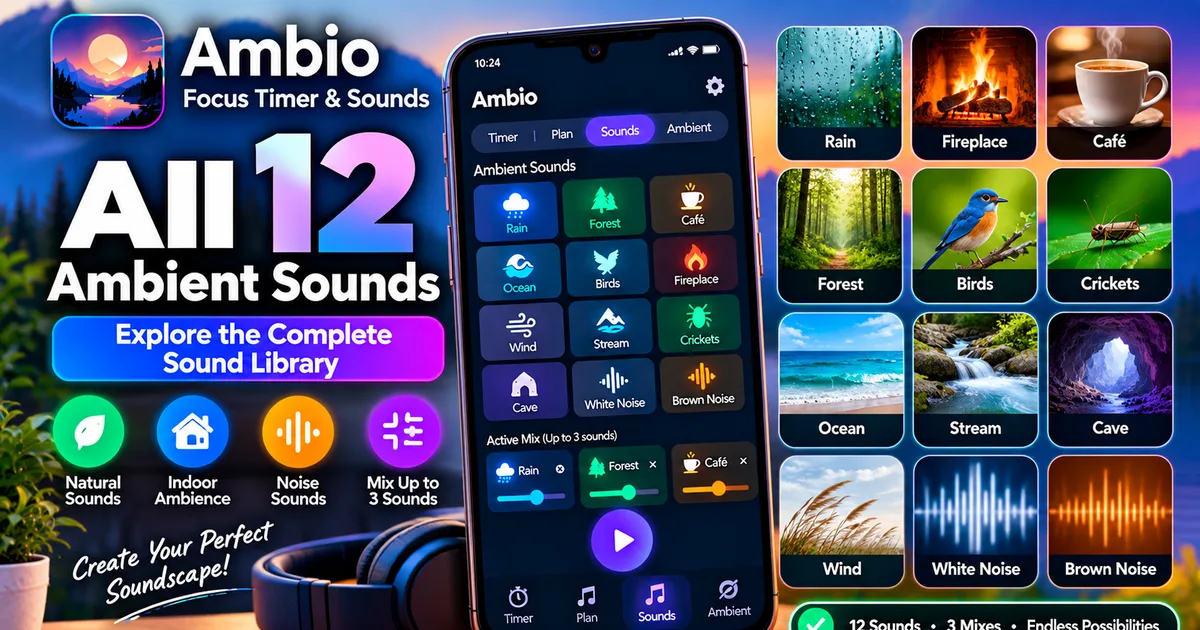
If you're looking for the Ambio sounds list, the app includes a built-in collection of 12 ambient sounds that you can use individually or combine into a custom soundscape.
Ambio: Focus Timer & Sounds is designed around the idea of creating your own audio environment instead of relying on a single fixed background track. You can select up to three sounds at the same time and adjust the level of each one independently.
The current Ambio sound library includes:
- Rain
- Fireplace
- Café
- Forest
- Birds
- Crickets
- Ocean
- Stream
- Cave
- Wind
- White Noise
- Brown Noise
This guide explains all 12 sounds and how they can be used with Ambio's mixer.
How Many Sounds Does Ambio Have?
Ambio currently provides 12 ambient sounds.
They are:
- Rain
- Fireplace
- Café
- Forest
- Birds
- Crickets
- Ocean
- Stream
- Cave
- Wind
- White Noise
- Brown Noise
You can select up to three of these sounds simultaneously.
Each selected sound has its own level, so you can create a mix where one sound is dominant and the others sit quietly underneath it.
1. Rain
Rain is one of the natural ambient options in Ambio.
It can be used as a standalone background sound or combined with other sounds.
For example, you could combine Rain with:
- Forest
- Café
- Fireplace
- Wind
Because Ambio allows individual sound levels, you can make Rain the main part of the mix and keep another sound quieter in the background.
Rain can also be used with Ambio's focus timer or Ambient Mode.
2. Fireplace
Fireplace provides a warmer indoor-style ambience.
It can be combined with sounds such as:
- Rain
- Wind
- Café
A Fireplace and Rain combination can create a different atmosphere from using either sound alone.
Like the other Ambio sounds, Fireplace has its own level when it is included in a mix.
3. Café
Café is designed around a social indoor atmosphere.
It can work as a background layer when you want something different from natural sounds.
You can combine Café with Rain, for example, to create a more layered environment.
Because Ambio supports up to three simultaneous sounds, you can build a combination around Café rather than having to listen to it by itself.
4. Forest
Forest is another natural sound in Ambio's library.
It can be used alone or combined with sounds such as Rain, Birds, or Wind.
A Forest and Rain combination creates a different soundscape from either sound independently.
If you prefer a quieter mix, you can reduce the Forest level and keep another sound more prominent.
5. Birds
Birds adds another natural layer to the Ambio sound library.
It can be paired with:
- Forest
- Rain
- Stream
You can also use Birds by itself.
Because Ambio lets you control individual sound levels, you don't have to keep every selected sound at the same volume.
6. Crickets
Crickets provides another nature-oriented option.
It can be combined with sounds such as:
- Forest
- Rain
- Ocean
Crickets can also be used as a secondary layer beneath another ambient sound.
The ability to control individual levels means you can keep the Crickets sound subtle if you don't want it to dominate the mix.
7. Ocean
Ocean is one of Ambio's built-in natural ambient sounds.
You can use it alone or combine it with other sounds.
Possible combinations include:
- Ocean + Wind
- Ocean + Crickets
- Ocean + Rain
These combinations are simply examples of how the mixer can be used. There isn't one required way to configure the sound library.
The important feature is that Ambio allows up to three sounds to be active at once.
8. Stream
Stream provides another water-based option.
It can be used as a standalone sound or layered with natural sounds such as:
- Forest
- Birds
- Rain
Stream can therefore be part of a broader outdoor-style soundscape.
As with the other sounds, you can control its level independently when it is part of a mix.
9. Cave
Cave is one of the less conventional choices in Ambio's sound library.
Instead of representing a typical outdoor environment like Forest or Ocean, it gives you another type of ambient atmosphere to experiment with.
You can use Cave alone or combine it with other sounds.
Because Ambio's mixer supports three simultaneous sounds, Cave can also serve as one layer in a larger soundscape.
10. Wind
Wind can be used by itself or combined with other ambient sounds.
Examples include:
- Wind + Forest
- Wind + Fireplace
- Wind + Ocean
The individual mixer controls allow you to determine how prominent Wind should be relative to the other sounds.
This makes it possible to use Wind as either the primary sound or a quieter background layer.
11. White Noise
White Noise is the first of Ambio's two noise-based options.
Unlike sounds such as Rain, Forest, or Ocean, White Noise isn't intended to represent a particular physical environment.
Instead, it provides a continuous noise-based background.
You can use White Noise by itself or combine it with another Ambio sound.
For example, you might experiment with White Noise and Rain and then adjust each level until the combination sounds comfortable to you.
12. Brown Noise
Brown Noise is the second noise-based option in Ambio.
It provides another continuous noise-style background that differs from White Noise.
You can use Brown Noise on its own or combine it with another sound.
For example:
Brown Noise + Rain
creates a different soundscape from:
Brown Noise + Forest
The mixer lets you adjust the individual levels so you can decide how much of each sound you hear.
Ambio Sounds: Complete List
Here is the complete current sound library in one place:
| # | Ambio Sound |
|---|---|
| 1 | Rain |
| 2 | Fireplace |
| 3 | Café |
| 4 | Forest |
| 5 | Birds |
| 6 | Crickets |
| 7 | Ocean |
| 8 | Stream |
| 9 | Cave |
| 10 | Wind |
| 11 | White Noise |
| 12 | Brown Noise |
The current Google Play listing and F-Droid information both describe Ambio as having these 12 sounds.
Can You Mix Ambio Sounds Together?
Yes.
One of Ambio's main features is its mixer.
You can select up to three sounds at the same time, with a separate level for each selected sound.
For example, you could create:
Rain + Forest + Birds
or:
Ocean + Wind + Crickets
or:
Fireplace + Rain + Café
The combinations are not limited to predefined presets.
You choose the sounds yourself and balance their individual levels.
How to Create an Ambio Sound Mix
Creating a mix is straightforward.
Step 1: Open Ambio
Launch Ambio: Focus Timer & Sounds on your Android phone.
Step 2: Open the Sound Mixer
Go to the sound area of the application.
You'll see the available ambient sound tiles.
Step 3: Select a Sound
Choose the first sound you want to hear.
For example:
Rain
Step 4: Add Another Sound
Select a second sound.
For example:
Forest
Ambio can mix the two together.
Step 5: Add a Third Sound
If you want a more layered environment, select one additional sound.
For example:
Birds
You now have:
Rain + Forest + Birds
Ambio supports up to three simultaneous sounds.
Step 6: Adjust Individual Levels
Each selected sound has its own level.
Adjust the sliders until the combination sounds the way you want.
You don't have to make all three sounds equally loud.
For example:
- Rain — high
- Forest — medium
- Birds — low
This creates a different balance from giving all three sounds the same level.
For a complete explanation of the mixer itself, see our Ambio Sound Mixer guide.
Does Ambio Remember Your Sound Mix?
Yes.
The current app description says that Ambio remembers your mix for next time.
This means you don't necessarily need to recreate the same combination every time you open the application.
The saved-mix behavior has also been addressed in Ambio's release history, which includes saved-mix fixes in version 2.0.
This is particularly useful if you regularly use the same sound combination for studying, reading, or relaxation.
Can You Use Ambio Sounds Without the Focus Timer?
Yes.
Ambio includes Ambient Mode, which allows the sound mix to run without using the normal focus timer.
The official description identifies Ambient Mode for activities such as:
- Reading
- Meditation
- Winding down
- Sleep
- General ambient listening
If you simply want background audio without a countdown, Ambient Mode is the appropriate part of the application.
For more information, see our Ambio Ambient Mode guide.
Can You Use Ambio Sounds While Studying?
Yes.
Ambio combines its sound mixer with a focus timer.
The app provides 25-minute and 50-minute Pomodoro presets as well as custom focus and break durations.
You can therefore create a sound mix and then use it during a focus session.
For example:
Rain + Café
could provide background audio while you work through a study session.
The choice of sound is personal, so experiment with different combinations rather than assuming one particular sound is best for studying.
You can learn more about the timer in our Ambio Focus Timer guide.
Can You Use Ambio Sounds for Sleep?
Ambio's Ambient Mode is specifically described for sleep and winding down, and the application also includes a sleep timer in recent releases.
You could use a single sound such as Rain or Ocean, or create a combination.
For example:
Rain + Forest
or:
Ocean + Wind
Keep the volume at a comfortable level and use the sleep timer if you want playback to stop automatically.
Our Ambio Sleep Timer guide explains that feature in more detail.
Can Ambio Sounds Be Used Offline?
Yes.
The current Ambio listing says the application works completely offline.
That means the built-in sound library can be used without depending on an online streaming service for normal playback.
This can be useful when:
- Wi-Fi is unavailable
- Mobile data is disabled
- You're traveling
- You're studying offline
- You're using airplane mode
For more details, see Does Ambio Work Without Internet?.
Does Ambio Stream These Sounds From the Internet?
The current application description says Ambio works completely offline and presents the 12 sounds as part of its built-in experience.
The app therefore isn't structured like a conventional online music-streaming service where every sound has to be downloaded from a remote server before it can play.
This is one reason the application can be used without an internet connection.
Are Ambio's Sounds Open Source?
The app itself is open source under the MIT License.
The current Google Play listing also states that all of Ambio's ambient sounds are CC0 licensed, described as public-domain audio.
Those are separate points:
- The application code uses the MIT License.
- The listed ambient sounds are identified by the developer as CC0.
Always check the current project information if you plan to reuse the audio outside the application.
Which Ambio Sound Should You Choose?
There isn't one objectively correct Ambio sound for every situation.
Different sounds create different environments, and personal preference matters.
You can use this as a starting point:
| If you want... | You could try... |
|---|---|
| Rain ambience | Rain |
| Warm indoor atmosphere | Fireplace |
| Café-style background | Café |
| Natural environment | Forest |
| Bird-filled nature ambience | Birds |
| Insect/nature layer | Crickets |
| Water ambience | Ocean |
| Flowing-water atmosphere | Stream |
| Unusual enclosed ambience | Cave |
| Air/natural background | Wind |
| Continuous noise | White Noise |
| Deeper noise-style background | Brown Noise |
These are suggestions for experimenting with the library rather than claims that a particular sound will produce a specific effect for everyone.
Ambio Sound Combinations to Try
Because Ambio allows three simultaneous sounds, you can experiment with different combinations.
Natural Mix
Rain + Forest + Birds
This combines three nature-oriented sounds.
Coastal Mix
Ocean + Wind + Crickets
This creates a broader outdoor-style combination.
Cozy Indoor Mix
Fireplace + Rain + Wind
This uses warmer indoor ambience together with natural background sound.
Café Study Mix
Café + Rain
A simple two-sound combination.
Noise Mix
Brown Noise + Rain
A noise-based layer combined with natural ambience.
Minimal Mix
Rain
Sometimes one sound is enough.
You don't have to use three sounds simply because Ambio allows three.
Does Ambio Have More Than 12 Sounds?
The current official app descriptions list 12 sounds.
The 12 currently listed are:
Rain, Fireplace, Café, Forest, Birds, Crickets, Ocean, Stream, Cave, Wind, White Noise, and Brown Noise.
The library could change in a future release, so check the current application listing or release information if you're reading this after a major update.
Ambio Sounds and Background Playback
You can use Ambio's sounds while the application is not actively displayed.
The current listing describes background playback with media controls available through Android's notification shade, lock screen, and Quick Settings.
This allows you to start a sound mix and then put the phone down while continuing to listen.
For troubleshooting background playback, see our Ambio Background Playback guide.
What If an Ambio Sound Isn't Playing?
If you select a sound but don't hear anything, check:
- Android media volume.
- The individual sound level.
- Whether playback is actually started.
- Bluetooth audio output.
- Other applications currently using audio.
- Ambio's background playback state.
- Your Ambio version.
You can also try selecting just one sound and pressing Play.
If Ambio still produces no audio, our Ambio Not Playing Sound troubleshooting guide covers the issue step by step.
Ambio Sounds: Quick Facts
Total sounds: 12
Maximum simultaneous sounds: 3
Individual sound levels: Yes
Built-in sound library: Yes
Offline operation: Yes
Ambient Mode: Yes
Focus timer: Yes
Background playback: Yes
Sleep timer: Yes
Sound combinations: User configurable
Current Android requirement: Android 12+ for the current F-Droid release
Frequently Asked Questions
How many sounds does Ambio have?
Ambio currently has 12 ambient sounds.
What are the Ambio sounds?
The library contains Rain, Fireplace, Café, Forest, Birds, Crickets, Ocean, Stream, Cave, Wind, White Noise, and Brown Noise.
Can Ambio mix multiple sounds?
Yes. Ambio can mix up to three sounds at the same time.
Can I control the volume of each Ambio sound?
Yes. Each selected sound has its own level control.
Does Ambio remember my sound mix?
Yes. The current app description says Ambio remembers your mix for next time.
Can I use Ambio without a timer?
Yes. Ambient Mode allows you to run your sound mix without a focus countdown.
Can I use Ambio sounds offline?
Yes. The current app listing states that Ambio works completely offline.
Does Ambio have Rain sounds?
Yes. Rain is one of the 12 built-in ambient sounds.
Does Ambio have Ocean sounds?
Yes. Ocean is included in the current sound library.
Does Ambio have White Noise?
Yes. White Noise is one of the 12 available sounds.
Does Ambio have Brown Noise?
Yes. Brown Noise is also included.
Can I use Ambio sounds while studying?
Yes. You can combine the sound mixer with Ambio's focus timer.
Can I use Ambio sounds for sleep?
Yes. Ambient Mode is intended for uses including sleep, and recent versions include a sleep timer.
Final Thoughts
The Ambio sounds library contains 12 built-in options covering natural ambience, indoor atmosphere, environmental sounds, and continuous noise.
The main advantage isn't simply the number of sounds. Ambio lets you combine up to three sounds and adjust their individual levels, giving you control over how the final soundscape is balanced.
If you want a simple setup, use one sound. If you prefer a more layered environment, combine two or three.
The same sound library can then be used with Ambio's focus timer, Ambient Mode, background playback, and sleep timer, depending on what you're doing.
Related Articles

How to Fix CapCut Video Lagging After Export on Android
Fix CapCut video lagging after export on Android. Learn how to troubleshoot choppy playback, frame-rate mismatches, heavy effects, storage issues, and export settings.
GetApkFree Team

How to Fix CapCut Preview Not Matching Export on Android
Fix CapCut preview not matching the exported video on Android. Troubleshoot missing effects, text, transitions, timing, colors, and rendering differences.
GetApkFree Team

How to Fix Couldn't Apply AI Background in CapCut on Android
Getting "Couldn't Apply AI Background" in CapCut on Android? Check usage limits, clip selection, video quality, app updates, and practical troubleshooting steps.
GetApkFree Team
How to Fix CapCut Effects Not Applying on Android
CapCut effects not working on Android? Check clip selection, effect layers, timeline timing, conflicting adjustments, and app performance with these practical fixes.
GetApkFree Team