Best Open-Source Android Launchers — Minimalist, Fast, and Privacy-Focused
GetApkFree Team
Eight open-source Android launchers compared using verified app, version, and permission data — search-first, keyboard-first, TV, and game launchers included.
Quick Answer
Eight open-source Android launchers compared using verified app, version, and permission data — search-first, keyboard-first, TV, and game launchers included.
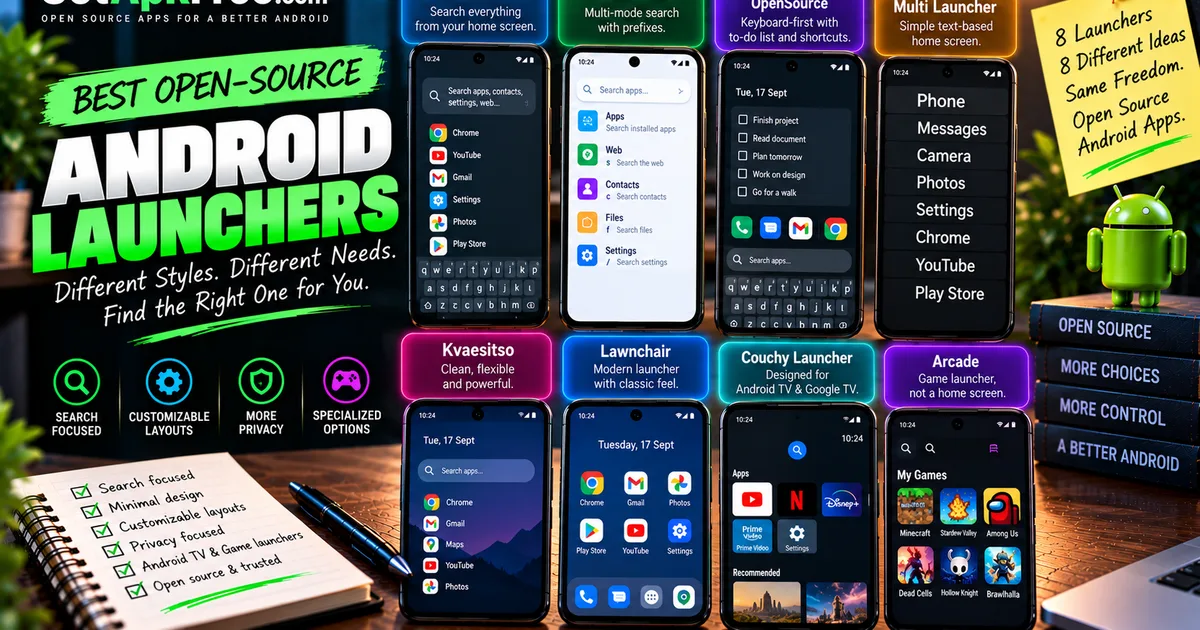
"Launcher" covers more ground than it sounds like it should. Some launchers replace your entire home screen with a search bar. Some replace app icons with plain text. Some are built specifically for a TV, and at least one of the apps below isn't a home-screen replacement at all — it's built for organizing games. This article compares eight open-source Android launchers from GetApkFree's catalogue, and one thing they have in common is that they solve genuinely different problems, not the same problem with different paint jobs.
How We Selected These Launchers
Every app here comes from GetApkFree's current catalogue, and every claim below is checked against that app's actual listing, its latest published version, and its Android manifest — not against marketing copy alone. As with the rest of this blog's open-source roundups, download counts aren't used as a ranking signal; most of the catalogue has little recorded download activity on GetApkFree yet, so popularity isn't a meaningful signal here.
This isn't a ranking toward one "winner." Two of the eight are specialized rather than general-purpose — Couchy Launcher is built for Android TV and Google TV, and Arcade is a game launcher, not a home-screen replacement — and both are identified as such below rather than compared head-to-head against the other six. For the apps that do request more unusual permissions, we say so directly; see our guide to what APK permissions actually mean if you want the background on any specific permission mentioned here.
SearchLauncher
SearchLauncher is search-first in the most literal sense: its own listing states the home screen opens directly to a keyboard, with one search bar finding apps, contacts, device settings, downloads, and the web, then opening web results in a browser the listing describes as ad-blocking. Ranking is stated to learn from what you pick, so repeat searches surface faster over time — that's the listing's own description of the feature, not something independently measured here.
The current manifest requests a broad set of permissions for a launcher, including QUERY_ALL_PACKAGES, PACKAGE_USAGE_STATS, READ_CONTACTS, and RECORD_AUDIO. The current listing and changelog don't explain what RECORD_AUDIO is used for, so we're not going to guess — it's simply present in the manifest today, worth knowing before you install.
SearchLauncher may suit someone who wants to open their phone and start typing immediately, without tapping through an app drawer first. At roughly 24 MB, it's the largest APK of the eight compared here.
Version: 0.0.18 · License: MIT · Size: 24.0 MB · Minimum Android version: 10.0.
Milki Launcher
Milki Launcher is also search-first, built from scratch with Kotlin and Jetpack Compose around what its listing calls "Multi-Mode Search": one bar that searches apps by default, and switches mode with a documented prefix — s for web search, c for contacts, and so on for the other modes the listing describes.
Its manifest requests contact and media permissions consistent with that multi-mode search reaching into contacts and files, plus CALL_PHONE, which the listing doesn't specifically explain. It's the smallest APK among the general-purpose launchers here.
Milki Launcher may suit someone who wants the search-first idea without SearchLauncher's larger download, and who's comfortable with prefix-based search modes rather than a single unified box.
Version: 1.2.0 · License: GPL-3.0-only · Size: 1.9 MB · Minimum Android version: 7.0.
MinkLauncher OpenSource
MinkLauncher OpenSource takes a keyboard-first approach aimed at "fast input and low visual noise," per its own listing — the Home panel combines a preview of up to five to-dos with eight configurable icon shortcuts, and every other installed app stays one keyboard search away.
Its changelog documents a specific, checkable change: document search now uses only folders you explicitly select through Android, and the listing states MinkLauncher OpenSource "no longer requests All files access." That's a real, verifiable reduction in what the app can reach — not a comprehensive privacy audit of the app, just one documented permission change worth knowing about.
MinkLauncher OpenSource may suit someone who wants a to-do list and a handful of shortcuts on their home screen rather than a full app grid.
Version: 1.0.0 · License: Apache-2.0 · Size: 11.5 MB · Minimum Android version: 8.0.
Multi Launcher ‧ Home Screen
Multi Launcher takes a different route to minimal: it replaces app icons with plain, readable text buttons. The listing describes customizable layouts, fonts, and gesture shortcuts, plus a biometric lock specifically for the launcher's own settings — separate from your phone's regular lock screen.
The listing also states the app "does not collect or share personal data." That's the developer's own claim in the app's listing, not something independently verified here — worth noting given the current manifest requests a fairly broad permission set for a text-based launcher, including both coarse and fine location, biometric and fingerprint access, and network state.
Multi Launcher may suit someone who finds icon grids visually noisy and would rather scan a list of names.
Version: 1.12.0 Build 0 · License: GPL-3.0-only · Size: 6.8 MB · Minimum Android version: 9.0.
Cyclauncher
Cyclauncher is built with Jetpack Compose around speed and one-handed use — its listing describes "effortless app accessibility, and seamless one-handed usability" as the design goal, with new mechanics aimed specifically at ergonomic daily use rather than novelty.
One fact worth stating plainly: the current published version is v0.7.1-alpha. That's the developer's own version string, not our characterization — this is pre-1.0, alpha-labeled software, not something we'd describe as production-stable. Its changelog is consistent with that stage: recent entries fix a launcher freeze after long idle periods, a stray haptic-vibration bug, and a popup-offset issue, alongside stated performance work on history and favorites lookups. As a verified manifest observation, Cyclauncher currently requests only two real permissions beyond the standard receiver marker — the smallest footprint of any general-purpose launcher in this comparison.
Cyclauncher may suit someone comfortable running alpha software in exchange for an actively developed, one-handed-focused launcher.
Version: v0.7.1-alpha · License: GPL-3.0-only · Size: 12.5 MB · Minimum Android version: 7.0.
Defang
Defang isn't a home-screen style choice so much as a behavior-change tool built on top of one. Its own listing describes it as "a speed bump, not a wall": opening a chosen app triggers a timer you can still override, by design — the point is friction and a moment of pause, not a hard block you can't get past.
Its changelog backs that framing up with something concrete: recent entries describe detecting when Snapchat tries to open without triggering Defang's intended delay, and patching the detection method as Snapchat changes its behavior — evidence the monitoring is real and actively maintained, not just described in marketing copy. That same capability is reflected in the manifest, which requests several permissions worth noting, including CAMERA, NFC, READ_CONTACTS, PACKAGE_USAGE_STATS, and WRITE_SECURE_SETTINGS. We're not calling Defang "private" or "safe" — those aren't conclusions the available data supports either way — just laying out what it does and what it asks for.
Defang may suit someone who wants a deliberate pause before opening specific apps, and who's comfortable with a wider permission footprint in exchange for that.
Version: 0.1.15 · License: GPL-3.0-only · Size: 2.2 MB · Minimum Android version: 8.0.
Couchy Launcher
Couchy Launcher is built specifically for Android TV and Google TV — not a phone launcher, and its own listing doesn't describe phone use at all. The listing's own words are "No ads. No tracking. No accounts. Just your apps," which we're reporting as the listing's claim rather than something GetApkFree has independently audited.
Worth knowing alongside that claim: the current manifest still requests INTERNET and ACCESS_NETWORK_STATE, so the app does have network access regardless of the no-tracking statement — network access and tracking aren't the same thing, but it's a fact worth having alongside the listing's own wording. Couchy Launcher also has the lowest minimum Android version of the eight apps compared here, going back to Android 5.0.
Version: 1.0.6 · License: GPL-3.0-only · Size: 2.2 MB · Minimum Android version: 5.0.
Arcade
Arcade is the one entry here that isn't a general home-screen replacement at all — its own listing describes it as "a minimal, Material You-themed game launcher," meaning it organizes and launches games specifically rather than replacing your phone's entire home screen.
The listing states Arcade can block offline games from reaching the internet using a VPN, framed as a way to save battery, block ads, and limit what those games can send out — a game-specific feature that doesn't apply to general app use. Its current minimum Android version is 13.0, the highest of the eight apps in this comparison, so it won't install on older devices the way several of the general launchers here will.
Version: 1.1 · License: GPL-3.0-only · Size: 2.7 MB · Minimum Android version: 13.0.
Launcher Comparison
| Launcher | Primary style | Scope | Minimum Android | Notable distinction |
|---|---|---|---|---|
| SearchLauncher | Search-first | General home screen | 10.0 | Keyboard-first entry, ad-blocking browser |
| Milki Launcher | Search-first | General home screen | 7.0 | Multi-mode search with documented prefixes |
| MinkLauncher OpenSource | Keyboard-first | General home screen | 8.0 | Documented removal of broad file-access permission |
| Multi Launcher ‧ Home Screen | Text-based | General home screen | 9.0 | Replaces icons with readable text buttons |
| Cyclauncher | Speed / one-handed | General home screen | 7.0 | Smallest permission footprint; alpha-stage version |
| Defang | Friction layer | Behavior tool, not a full launcher replacement | 8.0 | Documented app-detection evasion handling |
| Couchy Launcher | TV home screen | Android TV / Google TV only | 5.0 | Lowest minimum Android version |
| Arcade | Game launcher | Games only, not general home screen | 13.0 | VPN-based offline-game internet blocking |
Frequently Asked Questions
What makes a launcher "minimalist"? Among the launchers here, "minimalist" describes more than one approach: Multi Launcher strips icons down to plain text, while Cyclauncher's current manifest requests only two real permissions beyond the standard receiver marker. There's no single definition, and none of these apps are the only minimalist option available — they're just the ones in this comparison that lean that direction in a verifiable way.
Can I install more than one launcher and switch between them? Yes. Android lets you install multiple launcher apps side by side and choose which one acts as your default, typically from Settings → Apps → Default apps, or via a prompt Android shows the first time you open a second launcher. Installing one of these to try it doesn't require uninstalling whatever you're using now.
Why do some of these launchers request more permissions than others?
It generally tracks with what the app actually does. Cyclauncher's manifest asks for very little because its core job is showing and organizing app icons quickly. Defang's manifest includes several permissions worth examining, including CAMERA, NFC, READ_CONTACTS, PACKAGE_USAGE_STATS, and WRITE_SECURE_SETTINGS. More permissions aren't automatically a problem, but they are worth knowing about before you install — see our guide on checking whether an APK is safe to install for how to weigh that yourself.
Is Couchy Launcher suitable for a regular Android phone? Nothing in Couchy Launcher's current listing or version data describes or confirms phone use — it's positioned specifically for Android TV and Google TV. If you're looking for a launcher for a regular phone, the other seven apps in this article are built for that; Couchy Launcher is the TV-specific exception.
What's the difference between a game launcher and a general Android launcher? A general launcher like Milki Launcher or SearchLauncher replaces your entire home screen and is meant to be how you reach every app on your phone. Arcade, by contrast, is built to organize and launch games specifically, with features like offline-game internet blocking that only make sense in that narrower context — it's a tool for your game library, not a replacement for your home screen.
If you're new to installing APKs from outside the Play Store, our step-by-step installation guide covers the process end to end. For more open-source picks from the same corner of the catalogue, see our roundups of open-source privacy and security apps and open-source Tools apps.
Related Articles
Roblox Not Loading Games on Android? How to Fix It
Roblox games not loading on Android? Fix endless loading screens, failed connections, and games that close unexpectedly with practical checks for your network.
GetApkFree Team
Reddit Notifications Not Working on Android? How to Fix It
Reddit notifications not working on Android? Fix missing replies, comment alerts, chat notifications, and delayed updates by checking Reddit settings,
GetApkFree Team
Snapchat Camera Not Working on Android? How to Fix It
Is Snapchat’s camera showing a black screen or refusing to take photos on Android? Check camera permissions, update the app, clear its cache, and follow these practical troubleshooting steps.
GetApkFree Team
Pinterest Images Not Loading on Android? How to Fix It
Pinterest images not loading on Android? Fix blank Pins, missing pictures, endless loading, and feed problems with these practical troubleshooting steps.
GetApkFree Team